• Our new ticketing site is now live! Using either this or the original site (both powered by TrainSplit) helps support the running of the forum with every ticket purchase! Find out more and ask any questions/give us feedback in this thread!

Class 365 PBC Unit and PIS system

Status
Not open for further replies.

365 Networker

Member
Joined
19 Jul 2019
Messages
537
Next step, connecting the audio controller however I have an idea of how to do it.

This will be amazing having the destination on the external screen, messages on the internal screens and announcements to match!
Looking forward to seeing/hearing that. The next station announcements were triggered by a certain number of wheel rotations - is there a way to cycle through these?
 
Last edited:
Sponsor Post - registered members do not see these adverts; click here to register, or click here to log in
R

RailUK Forums

WMasterJedi

Member
Joined
23 Nov 2023
Messages
282
Location
England
Looking forward to seeing/hearing that. The next station announcements were triggered by a certain number. of wheel rotations - is there a way to cycle through these?
I am able to update the trains position using the update option in the menu and I think it will play the welcome announcement after selecting the route.

I’ll keep you updated on how this progress goes.

I may also need to purchase a more beefy 110V power supply as my current 500W one doesn’t produce enough current as the controller forgets its route after a little while presumably from current drops.

Until I get a better 1000W 110V supply I’m using my 5V 300W supply to connect to the 5V lines to artificially boost the current which works completely fine for the meantime.

I’ve also noticed that with this current boost:
#1 The self test happens in an instant (less than a second at least)
#2 The menus seem faster and button presses update it quicker
And #3 It doesn’t randomly loose the selected route
 

WMasterJedi

Member
Joined
23 Nov 2023
Messages
282
Location
England
On the “Update” option of the controller (accessed by pressing 3) I’m able to change the state of the train (position).

For each station there is 3 types (A) (D) and (J).

A is for the arrival and says something along the lines of “The next station is x” and optionally will say “change here for x” if that applies.

I’m unaware at the current moment as what D is for.

J is for in between stations, presumably stands for Journey. In this state the display will show “Route x”.

The controller will actually automatically go through all of these, it scrolls through A and D a couple of times and displays J for quite a while as I’m guessing it’s meant to last the entire time of it being in between stations. But the controller does automatically go through them one by one essentially emulating a journey.

Due to this I’m questioning wether it used wheel counting and instead just used timing.
 

WMasterJedi

Member
Joined
23 Nov 2023
Messages
282
Location
England
Update: D is for when the train is either at or leaving a station and says “This train is for x” “Calling at x” “The next stop is x”
 

bramling

Veteran Member
Joined
5 Mar 2012
Messages
20,387
Location
Hertfordshire / Teesdale
On the “Update” option of the controller (accessed by pressing 3) I’m able to change the state of the train (position).

For each station there is 3 types (A) (D) and (J).

A is for the arrival and says something along the lines of “The next station is x” and optionally will say “change here for x” if that applies.

I’m unaware at the current moment as what D is for.

J is for in between stations, presumably stands for Journey. In this state the display will show “Route x”.

The controller will actually automatically go through all of these, it scrolls through A and D a couple of times and displays J for quite a while as I’m guessing it’s meant to last the entire time of it being in between stations. But the controller does automatically go through them one by one essentially emulating a journey.

Due to this I’m questioning wether it used wheel counting and instead just used timing.

I’m sure it’s wheel rotations. As on GN if the train got diverted via Hertford (where the distance from Finsbury Park to Stevenage is slightly longer), the “next station” announcement for Stevenage would trigger somewhat early, and those for the subsequent stations were then early as well. But otherwise the announcements always played in the same place.
 

D365

Veteran Member
Joined
29 Jun 2012
Messages
13,180
does your 110V supply show the power draw? I’m very surprised that 4.5A isn’t enough for your test rig.
 

WMasterJedi

Member
Joined
23 Nov 2023
Messages
282
Location
England
I’m currently struggling to connect the audio controller to the system but I’ll keep trying!

Even if I can’t, I’m very happy with what I have done!

As far as I’m aware, no other single person has done something like this.
 

365 Networker

Member
Joined
19 Jul 2019
Messages
537
I’m currently struggling to connect the audio controller to the system but I’ll keep trying!

Even if I can’t, I’m very happy with what I have done!

As far as I’m aware, no other single person has done something like this.
Perhaps the link to the audio unit comes from the external dot matrix rather than the controller?
 

WMasterJedi

Member
Joined
23 Nov 2023
Messages
282
Location
England
does your 110V supply show the power draw? I’m very surprised that 4.5A isn’t enough for your test rig.
I was surprised too, however when large amounts of LEDs are lit the controllers LCD backlight dims slightly.

After injecting 5V at 60A the issues go away.
 

WMasterJedi

Member
Joined
23 Nov 2023
Messages
282
Location
England
I have made all of the wiring a lot better by using some connectors which perfectly fit over the pins of the MIL spec connectors snugly so then they don’t fall off.

Along with some fork connectors for grounding.

IMG_0127.jpeg
IMG_0122.jpeg
IMG_0124.jpeg
 

323212

Member
Joined
28 May 2024
Messages
10
Location
UK
I remember trying to get my cl323 destination board working. Finally realising it was 5v and some silly high ampage was a massive relief
 

WMasterJedi

Member
Joined
23 Nov 2023
Messages
282
Location
England
I remember trying to get my cl323 destination board working. Finally realising it was 5v and some silly high ampage was a massive relief
Sounds awesome!

I suggest creating a thread about that with some photos as I’d love to see and learn more about it.
 

RacsoMoquette

Member
Joined
24 Nov 2023
Messages
318
Location
South Cambridgeshire
I remember trying to get my cl323 destination board working. Finally realising it was 5v and some silly high ampage was a massive relief
Are you by any chance referring to the following? https://www.mattypsrailwaypics.com/uploads/9/3/9/5/9395206/5287701_orig.jpg
https://www.mattypsrailwaypics.com/class-323.html
https://www.mattypsrailwaypics.com/uploads/9/3/9/5/9395206/1440188_orig.jpg

The Class 323s upon introduction had the backlit LCD type, akin to the original displays of the Networkers (Though their examples were quickly modified to their current LED type soon after introduction). The examples on the 323s especially, were very unreliable, and often the text was deformed or non existent. The Class also had exterior side destination indicators, though they just stated the destination of the train akin to the front ones. The 1992 Tube Stock also had the same green backlit LCD type, and theirs were replaced with LED displays, akin to the 323s and Networkers as stated above.
 
Last edited:

RacsoMoquette

Member
Joined
24 Nov 2023
Messages
318
Location
South Cambridgeshire
Absolutely amazing news!

I was yet again wrong with the serial port and instead it uses some pins on the rear which connect to the controllers internal FSK modem.

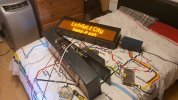
After connecting these pins to the screen, we get this amazing result!


Simply Fabulous! I loved hearing those characterful announcements! It reminds me so, of when I used to take FCC Class 365s to Cambridge about five or seven years back. Can you connect the board to show GN destinations? Also can you add the related audio announcements aswell?
 

WMasterJedi

Member
Joined
23 Nov 2023
Messages
282
Location
England
Simply Fabulous! I loved hearing those characterful announcements! It reminds me so, of when I used to take FCC Class 365s to Cambridge about five or seven years back. Can you connect the board to show GN destinations? Also can you add the related audio announcements aswell?
I'm very close to having the announcements to match, the last step is just connecting the audio controller to the main controller.
 

323212

Member
Joined
28 May 2024
Messages
10
Location
UK
Are you by any chance referring to the following? https://www.mattypsrailwaypics.com/uploads/9/3/9/5/9395206/5287701_orig.jpg
https://www.mattypsrailwaypics.com/class-323.html
https://www.mattypsrailwaypics.com/uploads/9/3/9/5/9395206/1440188_orig.jpg

The Class 323s upon introduction had the backlit LCD type, akin to the original displays of the Networkers (Though their examples were quickly modified to their current LED type soon after introduction). The examples on the 323s especially, were very unreliable, and often the text was deformed or non existent. The Class also had exterior side destination indicators, though they just stated the destination of the train akin to the front ones. The 1992 Tube Stock also had the same green backlit LCD type, and theirs were replaced with LED displays, akin to the 323s and Networkers as stated above.
Haha no not the LCD ones, though they were stored in a container at one point at soho depot. All of the LCDs had bled though so were essentially useless.

Ive got 3 LED ones but here are two (pre-refurb/trainFX) which I was testing at a friends house
 

Attachments

  • 20200716_135953.jpg
    20200716_135953.jpg
    2.6 MB · Views: 72

RacsoMoquette

Member
Joined
24 Nov 2023
Messages
318
Location
South Cambridgeshire
Haha no not the LCD ones, though they were stored in a container at one point at soho depot. All of the LCDs had bled though so were essentially useless.

Ive got 3 LED ones but here are two (pre-refurb/trainFX) which I was testing at a friends house
Its such a shame those (Pre TrainFX Displays) on the London Midland Class 323s were replaced. They were far more clear and readable than the, very poor quality TrainFX PIS!
 

WMasterJedi

Member
Joined
23 Nov 2023
Messages
282
Location
England
Haha no not the LCD ones, though they were stored in a container at one point at soho depot. All of the LCDs had bled though so were essentially useless.

Ive got 3 LED ones but here are two (pre-refurb/trainFX) which I was testing at a friends house
That’s amazing!
 

RacsoMoquette

Member
Joined
24 Nov 2023
Messages
318
Location
South Cambridgeshire
They were fitted during the WMR refurbishment in 2019, aswell as the Northern referbishement of the same time. They received new moquettes and interior paneling, aswell as poor quality flickery external PIS displays and those horrible blue “PowerPoint Presentation” like interior PIS displays. Which look so unweildy and the text is to big the slide breaks the sentences in to chunks. So the TrainFX system on the 2019 refurbished, 323s was a bit of a downgrade compared to their clear external PIS prior!
 

365 Networker

Member
Joined
19 Jul 2019
Messages
537
Thanks a lot for all of this. However the format is still incorrect - if it was really VOX ADPCM, the audio would be completely clear. My guess is that it could be either MS ADPCM or IMA ADPCM, with the same 16kHz sample rate and 4-bit encoding. I suspect the Piccadilly Line announcements that we have yet to properly convert to also be in one of these formats. Another clue is that some of the ScotRail files are encoded as MS ADPCM. Looking around the internet it seems to be incredibly hard to find software able to convert these formats back to WAV, although it appears there are some command line tools if you are skilled in that area. If not those formats then it could be one of the many other versions of ADPCM - including possibly a bespoke version.
Could it be anything to do with this - https://en.wikipedia.org/wiki/G.726 ?
I came across this after doing a search on A-Law audio. I noticed that when importing the bin files to audacity using A Law that whilst the audio was very distorted, the choppiness of the voice and chimes was no longer present.
 

WMasterJedi

Member
Joined
23 Nov 2023
Messages
282
Location
England
Could it be anything to do with this - https://en.wikipedia.org/wiki/G.726 ?
I came across this after doing a search on A-Law audio. I noticed that when importing the bin files to audacity using A Law that whilst the audio was very distorted, the choppiness of the voice and chimes was no longer present.
Interesting, I'd like to try and use that but can't find a software that can do it for the life of me!
 

WMasterJedi

Member
Joined
23 Nov 2023
Messages
282
Location
England
Bit of an update, I’ve been trying to connect the audio unit to the controller with not very much success however I’ve been able to connect the internal slave display to the master display.
 

WMasterJedi

Member
Joined
23 Nov 2023
Messages
282
Location
England
IMG_0998.jpeg
There are quite a few connectors on the back of the controller and they all connect to the PCB either using a serial connector or one of these connectors.

There are two of these connectors, one that is used for the input 110V signals to enable “Master” and this one which is just for the internal displays.

The pins are (labelled from left to right as shown in the image)

FSK TX, Ground, FSK RX, Unused and 110V out.

The 110V out is actually connected to the main power input of the internal displays, the big black relay as shown in the image gets switched on when the controller is in master and thus switches on 110V.

Before I found this out I was slightly confused on how people would of seen the “BRB class 465” message as it only appears when the screens first get power and only lasts for about 30 seconds however it now makes sense, because the screens only get power when the controller enters master which is when the cab gets setup (reverser out of off) that explains why people have seen the message as if you are in the train when the driver sets up the cab (reverser) you’ll be in there when the screens get power and show the message!

 

365 Networker

Member
Joined
19 Jul 2019
Messages
537
Do you have the relay unit? Perhaps this is where the signals to trigger the announcements came from?
 

365 Networker

Member
Joined
19 Jul 2019
Messages
537
The relay is the black box in the image, the signal for the internal displays is FSK while the announcement unit is RS-485.
The only other thing that I can think of is the audio EPROMs - are you certain that the SE ones are installed? It's possible the audio unit you own may have come from one of the original GN batch and therefore not contain the SE files. If so, you could probably switch the EPROM boards.
 

WMasterJedi

Member
Joined
23 Nov 2023
Messages
282
Location
England
The only other thing that I can think of is the audio EPROMs - are you certain that the SE ones are installed? It's possible the audio unit you own may have come from one of the original GN batch and therefore not contain the SE files. If so, you could probably switch the EPROM boards.
All EPROMs are in the audio unit (including SE ones)
 
Status
Not open for further replies.

Top