• Our new ticketing site is now live! Using either this or the original site (both powered by TrainSplit) helps support the running of the forum with every ticket purchase! Find out more and ask any questions/give us feedback in this thread!

Internet speed

Status
Not open for further replies.

45002

Member
Joined
7 Dec 2007
Messages
31
Location
Getting on all the right people's nerves !
Sponsor Post - registered members do not see these adverts; click here to register, or click here to log in
R

RailUK Forums

P156KWJ

Established Member
Joined
26 Nov 2007
Messages
4,226
Location
Nottinghamshire
that's what I'm doing, and if old bobby has a problem, claim your stupid with computers and you thought it was your own (not that they'd care anyway):lol:
 

Broken Viking

On Moderation
Joined
23 Oct 2006
Messages
1,666
Location
some place west of France
Hail All! <D
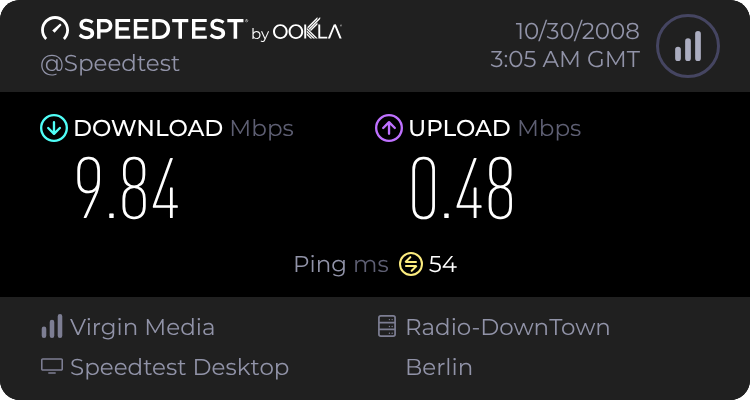
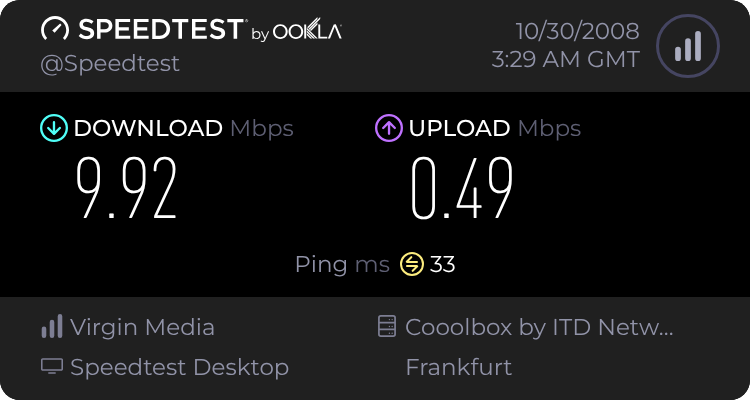
Here's a few that I tried with my connection in it's normal state...
347156823.png

347157220.png

347163986.png


...And here's one that I tried after reconfiguring my cable "modem" to use all available channels including CATV, CAFM and other DOCSIS compatable carriers... <D
speedtestnetbbdownloadsqw0.png


What interests me though is that in the original tests, I was getting almost as good a ping off of the server in Berlin as I was getting for London, which is odd considering the difference in distance! :o
Indeed check out my third one for Frankfurt...That's got the fastest results of all the "normal" tests that I ran! :shock::D8)

I have a sneaky suspicion that some people are using the London one for constant test purposes, and this might be slowing it down. Try less populated servers (One in Eastern Europe) and see if ye all get better results! <D
 

Mojo

Forum Staff
Staff Member
Administrator
Joined
7 Aug 2005
Messages
21,168
Location
0035
Still no excuse,your using somethink that you not paid for

Would you shop lift from Tescos because there No secuirty guard on duty
If I stole a chocolate bar from Tesco then they would be physically deprived of a chocolate bar and would be down by about 40p. If I used someone else's internet connection for 5 mins once (not that I do - I pay £230 per annum.) then unless they are charged by data transfer or have restrictive capping - they have lost nothing.
 

class 313

Established Member
Joined
10 Dec 2005
Messages
6,475
Location
St Albans
If I stole a chocolate bar from Tesco then they would be physically deprived of a chocolate bar and would be down by about 40p. If I used someone else's internet connection for 5 mins once (not that I do - I pay £230 per annum.) then unless they are charged by data transfer or have restrictive capping - they have lost nothing.

Apart from Bandwidth. Besides, they are not paying for you to share ;)
 

Beaker

Established Member
Joined
4 Sep 2005
Messages
1,488
Location
Not the drawing room
If I stole a chocolate bar from Tesco then they would be physically deprived of a chocolate bar and would be down by about 40p. If I used someone else's internet connection for 5 mins once (not that I do - I pay £230 per annum.) then unless they are charged by data transfer or have restrictive capping - they have lost nothing.

But you dont know ?

Ok so I can copy your identity ?
 

45002

Member
Joined
7 Dec 2007
Messages
31
Location
Getting on all the right people's nerves !
If I used someone else's internet connection for 5 mins once (not that I do - I pay £230 per annum.) then unless they are charged by data transfer or have restrictive capping - they have lost nothing.

Its still against the law ;)

Someone could be looking around there PC and come across there credit card details,then what

Where does it stop

MARTIN :D
 

class 313

Established Member
Joined
10 Dec 2005
Messages
6,475
Location
St Albans
that's what I'm doing, and if old bobby has a problem, claim your stupid with computers and you thought it was your own (not that they'd care anyway):lol:

If you are stupid with computers you wouldn't try to connect to a network, Of course they will care. Its illegal!

It's like saying, I am stupid. How does this gun work? *bang* opps I killed someone.

:roll:!
 

Broken Viking

On Moderation
Joined
23 Oct 2006
Messages
1,666
Location
some place west of France
Hail! <D
Just to quickly square things up a bit here (And speaking as a member of the Hacker/computer enthusiast community) please be advised that accessing a wireless network for any purpose without the express prior consent of the owner of said network is an offence under the Computer Misuse Act 1990CE (As amended) within the United Kingdom. Similar legislation may exist in some other countries as well. 8)

When accessing another person's wireless network, you are actually connecting into their own personal computer network (Normally at their home) and are therefore implicitly obtaining access to all resources on said network - Including computers, printers, scanners, NAS devices and so on.
Even if you only intend to obtain a route through to the Internet and access nothing else on that network whatsoever, you are still joining another persons private network without their permission, which again can constitute an offence.

Please be aware that under the Computer Misuse Act, it is not a sufficient defence to plead that because the network is "unsecured" or "open" to access, then all comers are implicitly invited to connect - The CMA takes into account the rights of less technologically aware users who may not know how to secure their networks properly, or even that their networks should be secured in the first instance. Although prosecutions for unauthorised wireless access under the CMA are fairly rare, they are certainly not unheard of...Do a Google search and ye'll probabally dig up several case studies! :shock::)

The only networks that can be considered "open to everyone" are ones that have no encryption whatsoever, AND have an SSID (Or message sent to thy PC during a network scan) that clearly permits and invites public users to connect to that network. SSIDs like "Free_public_access" and "Costa_Coffee_PUBLIC" can fit under this heading, but ones like "Hants_Library" and "Caffe_Macchiato" don't, as they only identify the site/network name and don't openly invite public connections! 8)

A friendly security warning:
Finally, I would advise people to be very careful when connecting to a wireless network that they do not own and fully control, as the potential for thy data to be stolen through this "untrusted" connection is very high. :shock::(
For example; It's both possible and very easy for me to set up an open wireless network called "Free_public_internet" or something similar (Default names like "linksys" are best for this) at home which feeds into my home broadband connection for Internet access, but also has a machine running on the same network that captures and logs everything that's sent across the connection - Including encrypted SSL traffic that I could crack into unencrypted data at my convienience. Anyone connecting to this "free" network of mine would be exposing all of the data that they're sending/receiving to my eyes without even realising it...Including the content of every e-mail, every photo, every webpage and so on. :!::o:?

Funniest of all though: As this would be my own network (And thus my property) then IIRC I would not be breaking the Law at all if I did this, especially if I were to warn the user (Through injecting outgoing HTML etc.) that their traffic may be recorded and analysed "for network maintenance purposes"... :shock::D;)

Farewell for now, and hope that this helps ye all to understand the legal standpoint and high security risks of "leeching" wi-fi... <D
>> Death <<
 

class 313

Established Member
Joined
10 Dec 2005
Messages
6,475
Location
St Albans
Making sure your network is passworded is simple. Just logon onto your router and set up the password from there. So. Simple.
 

me123

Established Member
Joined
9 Jul 2007
Messages
8,510
^For once, Loader, I agree with you. The number of people in my old job who called saying "Someone's hacked on to my unsecured wireless network and is doing not very nice things on it. What do I do?" was insane.

The best option is to enable WPA security if available; if not WEP will suffice. But you need security on the network.

I have to take the view that, if you have an unsecured wireless network, you deserve it to be abused by whoever accesses it, but that's a biased view.
 

mbonwick

Established Member
Joined
26 Oct 2006
Messages
6,311
Location
Kendal
Don't be. You should be pleased. It should (I hope!) be rather hard to hack into....
 

Broken Viking

On Moderation
Joined
23 Oct 2006
Messages
1,666
Location
some place west of France
The best option is to enable WPA security if available; if not WEP will suffice. But you need security on the network.
Granted, WEP security is better than no security at all, and it may be enough to keep "average joe" users from accessing ones network. :)

However, the WEP standard has a rather large flaw in it's implementation that means an experienced user with the right tools can find out all the necessary WEP keys required to connect to the network by passively monitoring network traffic without having to attempt a connection to the network itself beforehand, and therefore WEP encryption should never be viewed as a "secure" form of security. :(

I have to take the view that, if you have an unsecured wireless network, you deserve it to be abused by whoever accesses it, but that's a biased view.
I can see where ye are coming from with that point mate, but the thing to consider is that a lot of people who have wireless networks aren't as computer-savvy as some of us, and may not be aware of the necessity to secure their networks or how to go about it. :|
Consider the 50 year old who knows enough to simply turn on and use a computer, but knows very little about computer networks. If he sets up his new wireless router/AP and finds that it works in the way that he wants it to, then in all likelyhood he'll just leave it like that, and it'll never occur to him that other people may connect to his network to "leech" his broadband connection, or worse... :shock::(

Some might say that ignorance is no excuse for running an insecure network, and that one only has themselves to blame if they don't set-up their network securely. However wi-fi technology and modern computing is still very "new" to a lot of people, and therefore they can't really be blamed for not knowing how to set up something as potentially complex as a wireless AP or router. :(

Mine is WPA2, no SSID and an access list 8)
That's a very good configuration on thy part mate, and - Assuming the Hacker's perspective for a moment - With thy SSID hidden I wouldn't be able to identify which of several networks might be yours, and depending on what thy encryption uses as a "seed" it'd take me a very long time to "crack" any of thy network communications! 8)
The access list - Assuming that it's based on the MAC addresses of thy wi-fi cards - Is also an excellent additional measure, although I should warn ye that if I was able to find out the MAC address of one of thy "authorised" devices, then I could easily change the MAC in my own network card to match or "clone" it. :shock:

I myself do have a seperate wireless AP on my home network that is provided for the use of friends laptops and my own wireless devices, and this AP is set with a hidden SSID and WPA1-PSK encryption. However this AP is normally turned off at the mains whenever it's not specifically needed (So no network exists unless I need it to) and my general use home network is 10/100-Base-TX wired ethernet (Still the fastest and most secure home networking approach IMO) throughout. 8)<D
 

P156KWJ

Established Member
Joined
26 Nov 2007
Messages
4,226
Location
Nottinghamshire
If you are stupid with computers you wouldn't try to connect to a network, Of course they will care. Its illegal!

It's like saying, I am stupid. How does this gun work? *bang* opps I killed someone.

:roll:!

Tom, calm down already! Not everything I say is serious. ;)
 

mbonwick

Established Member
Joined
26 Oct 2006
Messages
6,311
Location
Kendal
That's a very good configuration on thy part mate, and - Assuming the Hacker's perspective for a moment - With thy SSID hidden I wouldn't be able to identify which of several networks might be yours, and depending on what thy encryption uses as a "seed" it'd take me a very long time to "crack" any of thy network communications! 8)
The access list - Assuming that it's based on the MAC addresses of thy wi-fi cards - Is also an excellent additional measure, although I should warn ye that if I was able to find out the MAC address of one of thy "authorised" devices, then I could easily change the MAC in my own network card to match or "clone" it. :shock:

I'm quite aware of MAC spoofing, but the harder you make it for people, the more likely they are to say "sod it, plenty more, easier targets than this"
I also try to turn off the AP whenever I know I won't be using it for a period of time - eg. at night, when I'm at school/out etc.
If there's no network, it can't be hacked.
 

me123

Established Member
Joined
9 Jul 2007
Messages
8,510
Ignorance is no excuse when you are given simple instructions on how to set up the network.

I appreciate the issues with WEP, but WEP is definitely better than no security. For the vast majority of users, WEP is good enough and tends to more reliable in my experience. (Then again, Tiscali routers are heaps of cr*p anyway...)
 

Broken Viking

On Moderation
Joined
23 Oct 2006
Messages
1,666
Location
some place west of France
I'm quite aware of MAC spoofing, but the harder you make it for people, the more likely they are to say "sod it, plenty more, easier targets than this"
I also try to turn off the AP whenever I know I won't be using it for a period of time - eg. at night, when I'm at school/out etc.
If there's no network, it can't be hacked.
True, and that's pretty much the approach that I take with my AP. With my PCs and printer all being wired into the network anyway, having my AP running is pretty pointless 99.9% of the time anyway. :)

If I need to connect a friends laptop to my network and want to avoid using wi-fi methods (Which I only really use for synchronising mobile phones and similar devices, normally) then it's much faster for me to fish out a patch cable and add the laptop to my wired network anyway! 8)

I appreciate the issues with WEP, but WEP is definitely better than no security. For the vast majority of users, WEP is good enough and tends to more reliable in my experience. (Then again, Tiscali routers are heaps of cr*p anyway...)
True, true, and I have to confess that I havn't actually tried hacking into a WEP'd network yet...Although I may well do it a couple of times in the future (Lots of people in my street are using Sky broadband, I see! :shock:) just for the know-how and experience. :)

...And it just occured to me that dial-up internet connections could prove slightly more secure than a lot of broadband services in some ways!
  • Broadband connections give each connection a public, Internet accessible I.P. address that could - Thereoretically - Be reached from anywhere on the Internet...And so anyone wishing to attack one's computer only needs to find the IP address for that computer's network! :shock:
  • Dial-up connections on the other hand connect to servers shared with other subscribers via PSTN lines, and therefore the I.P. address would take one to the ISP's dial-up server insted of the person's own home network. Additionally, the *much* slower speed of dial-up means that keylogging and botnet activity would be so much easier for the user to notice! :o:D
On the other hand though, I'd rather have a semi-risky broadband connection running through a semi-dedicated carrier, then tie-up my 'phone line with my surfing. On top of that, cable (And I would hope ADSL) connections should be inherantly resistant to dialerware (Malicious software that clocks up premium-rate calls on thy 'phone line) as well! 8)<D

--- Old post above / New reply below: ---
if you want something simple - don't get a belkin :lol:
I've had a Belkin router running my wired network for years, and personally I've never had any issues with it...And as far as configuring the thing goes, a three year old could do it in his sleep! :D

On the other hand though, my back-up router (Also a Belkin) has a very bad firmware version on it which refuses to update...And thus for all intents and purposes it's not really usable... :sad:
 
Last edited by a moderator:

class 313

Established Member
Joined
10 Dec 2005
Messages
6,475
Location
St Albans
I've had a Netgear router for years, now I've moved house and have cable, I just got the cable version of the router I had at my old house. Pretty good it is too.
 

45002

Member
Joined
7 Dec 2007
Messages
31
Location
Getting on all the right people's nerves !
http://www.titan-adsl.co.uk

Not that I'm with them, but I've heard good reviews. And at 30GB/month for £20 (+VAT), you can't really argue.
Oh, and you get 300GB off peak with that

BT will be rolling out ADSL-2 next year,there about 1000 people including me testing it in Birmingham and Wolverhampton area

On BT Broadband ADSL 2+ speed trial's

http://beta.bt.com/bta/forums/thread.jspa?threadID=2419

Despite a rocky start to the trials, speeds are looking very good !

But dont forget,Speed does depend how far your are from the Exchange and how many phones you got plug into your phone line.

MARTIN ;)
 
Status
Not open for further replies.

Top