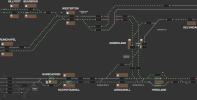
• Our new ticketing site is now live! Using either this or the original site (both powered by TrainSplit) helps support the running of the forum with every ticket purchase! Find out more and ask any questions/give us feedback in this thread!

Traksy Website

takno

Verified Rep - Traksy
Joined
9 Jul 2016
Messages
6,574
Many thanks. This is a brilliant resource which is really useful. I got caught in the mess on the ECML hold-ups this weekend and Traksy was invaulable. The train crew did not know what was happening and they asked me to show them the queue of trains ahead of us.

My immediate reaction to the new version is that it is in 'dark mode' on my phone. It looks like a night-time version with a black background which is much harder to read. Is that intentional or is there some quirk with my Android (Samsung) phone? On the plus side, having a landscape mode is really helpful. I was using the old version in landscape mode to track my journey (to be able to see which trains are ahead) and the old version certainly did jump around a lot and was hard to maintain a steady scaling on a phone. So a stable landscape mode will be great. Thanks again. Your work is much appreciated.
Thanks for sharing. Being able to see the scale of the queue in front is often the most useful bit for me as well!

The dark mode should be the same as on the current "new" site. It's supposed to be taken from your browser default (which is usually the same as the Android default). Android is a bit funny with settings to automatically enable dark mode at night which might be confusing things. If you want to force light mode on any of the new versions of traksy click on your email address in the top-right and then press on "Toggle theme" until it reads "Toggle theme: light".
 
Sponsor Post - registered members do not see these adverts; click here to register, or click here to log in
R

RailUK Forums

janb

Member
Joined
16 Jul 2008
Messages
833
One thing I've noticed on the "newer" version of the site, the past couple of days the 5C08 head code hasn't cleared from platform 4 at Lancaster in the morning.
 

WillC

Member
Joined
20 Oct 2019
Messages
125
Location
Leeds
Yet another thanks to Traksy. I use it all the time to find out what's actually going on. Often it tells me a great deal more than the official announcements.
 

janb

Member
Joined
16 Jul 2008
Messages
833
One thing I've noticed on the "newer" version of the site, the past couple of days the 5C08 head code hasn't cleared from platform 4 at Lancaster in the morning.
5C00 on platform 3 this morning.
 

gabrielhj07

Established Member
Joined
5 May 2022
Messages
1,600
Location
Herts
One thing that’s slightly annoying: when I refresh the website the map tends to return to its original location. For example I could have scrolled all the way to Peterborough, but refresh and it returns to King’s Cross (for example).

This only seems to happen with the /new version of the website. Is there a setting to stop it doing that?
 

takno

Verified Rep - Traksy
Joined
9 Jul 2016
Messages
6,574
One thing that’s slightly annoying: when I refresh the website the map tends to return to its original location. For example I could have scrolled all the way to Peterborough, but refresh and it returns to King’s Cross (for example).

This only seems to happen with the /new version of the website. Is there a setting to stop it doing that?
I know it used to do that a bit, but it should have stopped it in the past couple of weeks. If it's still happening regularly for you could you drop an email to info@ with some information about what device and browser you are using?

We have much better error logging in place now, so I've been working through the last couple of weeks squashing the bigger bugs as they appear. Hopefully if you have a specific issue then I can track it down and deal with it.
 

milooo

Member
Joined
3 Dec 2024
Messages
201
Location
Stevenage
Something I have noticed is the recent searches box doesn't go away after selecting an option and all trains that pass and don't stop at a timing point are showing a 'D' for departure
 

takno

Verified Rep - Traksy
Joined
9 Jul 2016
Messages
6,574
Something I have noticed is the recent searches box doesn't go away after selecting an option and all trains that pass and don't stop at a timing point are showing a 'D' for departure
The D just reflects what the report says. TRUST doesn't have a way to report a train passing a point, so it just reports an arrival or a departure instead. If you click on the "Raw" button you can see that it often reports both. I'm tempted to make it say pass, but in a way I prefer it to more accurately reflect the source data.

On recent searches, could you send a screenshot of what you mean?
 

milooo

Member
Joined
3 Dec 2024
Messages
201
Location
Stevenage
The D just reflects what the report says. TRUST doesn't have a way to report a train passing a point, so it just reports an arrival or a departure instead. If you click on the "Raw" button you can see that it often reports both. I'm tempted to make it say pass, but in a way I prefer it to more accurately reflect the source data.

On recent searches, could you send a screenshot of what you mean?
Okay thanks. I have attached a screen recording of what I mean by the search box not going away. (Video is of traksy app and search box)
View attachment screen-20260514-153300-1778769171848.mp4
 

gabrielhj07

Established Member
Joined
5 May 2022
Messages
1,600
Location
Herts
I know it used to do that a bit, but it should have stopped it in the past couple of weeks. If it's still happening regularly for you could you drop an email to info@ with some information about what device and browser you are using?

We have much better error logging in place now, so I've been working through the last couple of weeks squashing the bigger bugs as they appear. Hopefully if you have a specific issue then I can track it down and deal with it.
Cheers takno, will do.
 

takno

Verified Rep - Traksy
Joined
9 Jul 2016
Messages
6,574
Okay thanks. I have attached a screen recording of what I mean by the search box not going away. (Video is of traksy app and search box)
Oh, that's interesting. Seems to be really consistent on Chrome so I'm surprised I haven't noticed, although it doesn't happen on Firefox at all. I have a suspicion I know what's causing it, so I'll try to get a fix out in the next day or two. Tapping on the edge of the screen outside of the search box should make it hide in the meantime.
 

Class707SE

Member
Joined
2 Aug 2025
Messages
63
Location
London
I'm not been able to get the new Oxford - Bristol services to show their journey. They're not showing up, when I click view all on 1N67 for example.

Is it because they were only added last minute to the timetable?
 

takno

Verified Rep - Traksy
Joined
9 Jul 2016
Messages
6,574
Hmm interesting. They are showing up just fine on the beta site, and they appear to be perfectly normal schedules.

Is anything else missing? I'm pretty constrained for time this week, so I may not be able to look into in detail. It would be good to know how big the issue is though
 

ainsworth74

Forum Staff
Staff Member
Global Moderator
Joined
16 Nov 2009
Messages
31,067
Location
Redcar
Something not quite right with Darlington:

Screenshot_2026-07-10-17-47-55-94_40deb401b9ffe8e1df2f1cc5ba480b12.jpg

Needless to say 1E23 was heading for the berth above 1S22 rather than a Mexican standoff! That was today around 1745.
 

takno

Verified Rep - Traksy
Joined
9 Jul 2016
Messages
6,574
Something not quite right with Darlington
Harsh.

It looks like they bumped all the bit-mappings around by one when they added the new routes, rather than just slotting the new bits in a spare space in the mapping table. They do that kind of thing quite often now, irritatingly. I'll try to take a look over the weekend if I can remember how to make the analysis code work nice.

Did anybody spot the new features this week btw? I've been meaning to do a post about them, but I got a bit tied up in administration.
 

ainsworth74

Forum Staff
Staff Member
Global Moderator
Joined
16 Nov 2009
Messages
31,067
Location
Redcar
:lol:
It looks like they bumped all the bit-mappings around by one when they added the new routes, rather than just slotting the new bits in a spare space in the mapping table. They do that kind of thing quite often now, irritatingly. I'll try to take a look over the weekend if I can remember how to make the analysis code work nice.
Thanks!
 

zwk500

Veteran Member
Joined
20 Jan 2020
Messages
18,401
Location
Northampton
Harsh.

It looks like they bumped all the bit-mappings around by one when they added the new routes, rather than just slotting the new bits in a spare space in the mapping table. They do that kind of thing quite often now, irritatingly. I'll try to take a look over the weekend if I can remember how to make the analysis code work nice.
Probably related to the way the route tables are written for the preferred route order to follow the logical sequence of route letters from each signal.
 

takno

Verified Rep - Traksy
Joined
9 Jul 2016
Messages
6,574
Probably related to the way the route tables are written for the preferred route order to follow the logical sequence of route letters from each signal.
Oh absolutely. It's just that the way things were typically handled in the past was that the bit mappings were very rarely changed more than necessary, so a new route would be stuck in a spare slot even if it was out of sequence. Presumably on newer systems there are fewer consequences to making a bigger changer, so it makes more sense to keep the ordering. It's just a bit of pain for those of us who don't get provided with the updated mappings.
 

trei2k

Member
Joined
25 May 2010
Messages
228
Takno, I was wondering if you were aware of issues with the route indicators around Glasgow?

Screenshot below shows all the routes being indicated at the same time for a lot of sets of points. This issue has been on going for a number of months. I assume something changed in the data source - as it was generally working well before?
 

Attachments

  • Screenshot 2026-07-11 at 17.47.41.png
    Screenshot 2026-07-11 at 17.47.41.png
    154 KB · Views: 83

takno

Verified Rep - Traksy
Joined
9 Jul 2016
Messages
6,574
Takno, I was wondering if you were aware of issues with the route indicators around Glasgow?

Screenshot below shows all the routes being indicated at the same time for a lot of sets of points. This issue has been on going for a number of months. I assume something changed in the data source - as it was generally working well before?
I keep meaning to remove or figure out the mappings on Yoker. I believe it got recontrolled to a workstation a few months (or more) ago, and unsurprisingly they completely changed all the mappings.
 

HChip

On Moderation
Joined
14 Jul 2025
Messages
19
Location
England
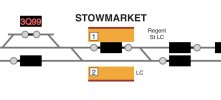
Platform numbers at Stowmarket are the wrong way round!

Plat 2 is the one with the DGL (where 3Q99 is) and Plat 1 is the other side.
 

Attachments

  • IMG_4747.jpeg
    IMG_4747.jpeg
    52.9 KB · Views: 51

Falkland Yard

Member
Joined
28 Jun 2023
Messages
11
Location
West Scotland
I keep meaning to remove or figure out the mappings on Yoker. I believe it got recontrolled to a workstation a few months (or more) ago, and unsurprisingly they completely changed all the mappings.
The workstations were changed to ones from Resonate instead of the Alstom MCS system.
 

coral reef

Member
Joined
11 Mar 2009
Messages
26
Hi Takno. May I suggest a couple of tweaks.

On android, when clicking on a train id no, can you put an x box to close it again on the collapsed menu at the top rather than having to click on the 3 dots to get the x box. The desktop version has the x at the top.

On the desktop version, can you widen the window so that the departure dly column isn't obscured by the scrollbar.

Also, can you build a Chatham Mainline page. At the moment this route is split between a Victoria to Medway page and the North Kent line page. Whilst historically meaningful the North Kent line doesn't currently have anything to do with Faversham, Canterbury, Margate, Ramsgate or Dover. Having the latter on a NKL page is like having the northern end of the ECML tacked on to the end of the MML.
 

takno

Verified Rep - Traksy
Joined
9 Jul 2016
Messages
6,574
Hi Takno. May I suggest a couple of tweaks.

On android, when clicking on a train id no, can you put an x box to close it again on the collapsed menu at the top rather than having to click on the 3 dots to get the x box. The desktop version has the x at the top.

On the desktop version, can you widen the window so that the departure dly column isn't obscured by the scrollbar.

Also, can you build a Chatham Mainline page. At the moment this route is split between a Victoria to Medway page and the North Kent line page. Whilst historically meaningful the North Kent line doesn't currently have anything to do with Faversham, Canterbury, Margate, Ramsgate or Dover. Having the latter on a NKL page is like having the northern end of the ECML tacked on to the end of the MML.
On Android the train summary widgets can be removed by swiping them left or right, which might help. I'd love to get the X on there, but it really cuts down the space for information - I suspect I'd be better off just making it more obvious to users what other options are available to close the widget. I may also put in some changes to more actively get rid of "stale" widgets if they've been lying around for more than a couple of hours. Definitely open to feedback on those widgets though - it's useful to have them persist between maps and over page refreshes, but I find myself constantly having to close ones which I don't really need.

Which browser are you seeing the dly column issue in? I changed it recently to stop it being obscured in Firefox and on mobile, but I suspect it might have made it worse on Chrome.

Happy to look at the Kent maps. South-Eastern is probably the area of the country I know least well. The maps there have mostly ended up being drawn London-first, with other lines crammed in a bit wherever they seemed to fit. Happy to rejig the maps, possibly splitting into 3 maps with some duplication, but it's a painful process so I'd like to be sure I'm moving in a useful direction when I do it!
 

Deepgreen

Established Member
Joined
12 Jun 2013
Messages
7,458
Location
Gomshall, Surrey
Apologies if this has been covered elsewhere but it didn't show in a thread search here. I was on a train from Redhill to Gatwick today and idly looking at Traksy, when I noticed that it showed us being routed into a "RUST" siding at Redhill, instead of to Gatwick! On the attached screenshot, I was on train 1O62, which is shown as routed to the sidings. I noticed there was a TPWS code on the down main line. As is normal, our train actually used trailing crossover 1946, adjacent to the junction. My question is does 'Traksy' use a direct feed from NR for its data and routeing, or is the data amended before display on the app?

A few minutes later, our train was shown on the Traksy track diagram at Gatwick as being on a collision course with a TL 700 crossing from down fast to down slow at the crossovers at the London end of the station, when in fact (obviously) we crossed in parallel, with my train using p2 as usual.

Not a complaint - I'm just curious about the data used.


Screenshot_20260730_101452_Samsung Browser.jpeg
 

Top