• Our new ticketing site is now live! Using either this or the original site (both powered by TrainSplit) helps support the running of the forum with every ticket purchase! Find out more and ask any questions/give us feedback in this thread!

Scanning Photographs

8ace

Member
Joined
25 Dec 2019
Messages
270
Location
Brighton
I have to assist my computer-illiterate Uncle in scanning has large collection of mostly railway photographs and I'm looking for advice.
Although I've been a software engineer for over 25 years I've never once had reason to use a scanner!
He has an iMac and a scanner.
The photographs are mixture of 35mm, and larger format hasselblad and rollieflex. There a both prints and transparencies.
!. What resolution should I scan at?
2. What file format should I save the files as? jpeg?
 
Sponsor Post - registered members do not see these adverts; click here to register, or click here to log in
R

RailUK Forums

BeeBus

Member
Joined
19 Mar 2024
Messages
68
Location
Oldham
When considering file format it's important to consider what you are trying to do by scanning. If it is simply to allow easy viewing then JPEGs are fine and don't need to necessarily be high resolution.

However, when I scan images I am treating the scan as an archive copy of the image and so go for quite high resolution and store it as an uncompressed TIFF file. I still have a JPEG as a working copy as well. For 35mm I scan at 3200dpi and for larger format 2400dpi. This does give quite large files, particularly for 9cm x 6cm colour images which end up at around 130MB - scary when I think back to my first computer which had, by the standards of the day, quite a large 1.6GB hard drive which would have stored about ten images! Storage is relatively cheap, though, and it is quite simple to make a small file from a large one. To do it the other way involves basically doing it again.

This leads me to what I think is the most important advice I can give, which is to think hard about what you want to do, make a small number of scans and work out what you want to do long-term before you start scanning. It takes a long time to scan large numbers of images and the last thing you want to do is to have to do it twice. (I have the T-shirt should you need it!) In this you need to consider the capabilities of the scanner. My first one was good, but when it came to denser colour slides gave quite poor results. I use an Epson V800 now which is one of the best consumer-grade scanners. If you're not going to be able to obtain the best quality scans then there is little point in going for very high resolution and uncompressed formats.

Hopefully this is of some help.

I also should add that because there is always some loss in image detail when a print is made, if you are not scanning off the original negative/transparency I personally see little point in going for archival quality. I see plenty of point in producing a digital version though as it makes viewing and sorting images so much easier.
 

Harpers Tate

Established Member
Joined
10 May 2013
Messages
2,033
Does his scanner scan transparencies and negatives? They have to be specially equipped for this purpose, especially with a backlight to shine through rather than on the film.

If yes, then I'd recommend going straight to those negatives and slides, and not using any prints. I used ~3000dpi for my 35mm. At that resolution I can just about make out 400 ASA colour film grain when zoomed in. Results will certainly depend hugely on the originals - camera lens, focus, film stock used etc.

Use prints only where necessary either because of damage to, or non-availability of negatives or if the scanner isn't equipped and you don't want to invest in another.

JPEG is fine IMO. Use a high quality number for fewer artefacts, use a lower quality number to save file size.
 

8ace

Member
Joined
25 Dec 2019
Messages
270
Location
Brighton
He has a vague idea of publishing a book, they are good photographs but there are a lot out there and I don't think he should go down the route of vanity publishing personally. I did suggest him putting them on flicker but I'm not sure he really understands that concept - maybe once I've shown it to him he'll get. He's getting on in years and has had a few health problems recently (same as all of us :() so I think want the photos preserved for prosperity somehow. I've already purchased a 2TB external SSD in anticipation of the a the large volume of data - seems like .Tiff would be the way to go. I don't about the particular scanner he has I'll have to consult with my sister who help him purchase it. Thanks so much for your advice gentlemen :)

He's a decent photographer, had pic on the cover of Railway Magazine publish back in the 80s - was an A4 in the cutting just to the north of Dunblane IIRC :)
 
Last edited:

etr221

Established Member
Joined
10 Mar 2018
Messages
1,579
Coming a bit late to this...

I would agree with everything that Beebox and Harpers Tate have said: think about what you want to do (and why), then essentially scan at the highest resolution, negatives rather then prints if you have choice, and to a non-compressed format, e.g. TIFF. This gives you the best base for whatever else you/he wants to do later. A general comment is that any image can be improved with a bit of manipulation (how much do you want to do? - a whole new ball game...). Once you've got a 'top quality master', then think about producing smaller, Jpeg type images for viewing.

When you say 'large collection' what do you mean - hundreds, thousands, tens of thousands, hundreds of thousands...? Think about managing/cataloguing them...

For Scanning software, Vuescan from Hamrick Software is generally reckoned to be about the best - it will drive most scanners (claims over 8000!), and is available for "All Operating Systems" (at least any you're likely to have). Their website has a lot of advice about scanning in general, beyond their product, so take a look - and perhaps hunt for photography/scanning specific websites for more advice.

And if the object is 'preserve for posterity', think about what comes next... publication? (and how) Or one of the archives (the Bluebell has one I believe)?
 

8ace

Member
Joined
25 Dec 2019
Messages
270
Location
Brighton
Hello again,
spoke to my uncle and it was unclear what scanner he has - in fact it might even be just a printer FFS lol.
Any recommendations for a suitable scanner if we (he) has to purchase new one?
It's 100's of photo rather than thousands in answer to your question @etr221 (thanks for replying btw :))
 

Peter Mugridge

Veteran Member
Joined
8 Apr 2010
Messages
17,787
Location
Epsom
spoke to my uncle and it was unclear what scanner he has - in fact it might even be just a printer FFS lol.
Any recommendations for a suitable scanner if we (he) has to purchase new one?
Whatever you do, don't get a Xerox C235. It's a good printer but an absolutely sub standard scanner.

My previous one was a Samsung 4195, but unfortunately no longer made so when it expired... and I ended up with the C235; I didn't have much choice, so I'm stuck with it for the forseeable, but if you can find something that matches the standard of the old Samsung range, I'd definitely go for it.
 

etr221

Established Member
Joined
10 Mar 2018
Messages
1,579
Hello again,
spoke to my uncle and it was unclear what scanner he has - in fact it might even be just a printer FFS lol.
Any recommendations for a suitable scanner if we (he) has to purchase new one?
It's 100's of photo rather than thousands in answer to your question @etr221 (thanks for replying btw :))
I'm not sure I would describe 100s as being a large collection myself - but there speaks someone who does have tens (if not hundreds) of thousands of photos!

I would hesitate to recommend any particular scanner myself - the VueScan/Hamrick Blog page has some 'Best Scanner' type pages, giving their selection, also providing some advice on choosing; Filmscanner Info are a German operation that specialise in scanning, I think have some useful info, or a web search for 'Best Scanners' will produce many results, including various review sites.

But points to consider:
1) What budget do you have? - A major consideration. (Apart from 'price', also worth thinking about the 'effort' involved in slide/image handling)
2) Note Harpers Tate and Beebox's advice over scanning resolutions - compare this with the scanner specifications.
3) For slides/transparencies or negatives (if you have them, I think better to scan these than prints) you will need a transmissive (i.e. one shining light through) rather than reflective scanner. There are dedicated film/slide scanners, also flatbed scanners which have a light source in the lid, so can do both slides/negatives and prints. But - a word of warning - this is to some extent a dying technology - those who want one, have one, not enough people want a new one to keep the manufacturers interested (so, e.g. Hamrick's recommendation of an Epson V600 is no longer available). So be prepared to look at the second hand market (ebay (a quick look showed several V600s as available)/wherever)...
4) A (newish) concept is from Valoi - take a look, essentially it is a 'box' with light and slide/film holder that will fit on the front of a (suitable) digital camera, that will take a picture of your original. But you need suitable camera and lens, also whatever software you want/need to deal with the results. Not a a scanner in the conventional sense.
5) If you only have 100s of images, a professional scanning service may be an option to consider - either on a straightforward 'scanning service' basis; or there are various (transport photo) archives that might 'do a deal' - scan your images and supply you a copy in exchange for it going in their archive - so think carefully and understand what you're signing up for... Examples include ColourRail, SiCol, Online Transport Archive and Transport Treasury.
 
Last edited:

8ace

Member
Joined
25 Dec 2019
Messages
270
Location
Brighton
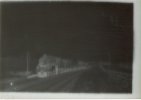
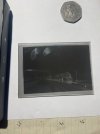
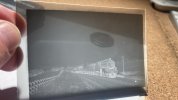
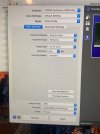
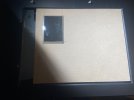
It turns out most of images are on glass plates. From a bit of googling it seems that I’m just meant to lay it directly on the glass scanner bed which is what I have done here with a quick low res scan. The scanned image is coming out as a negative (the image on the plate is a negative).
Some questions if anyone has the time please.
1. Is there something in the settings I can change to make the scanned image positive or is this something done in photoshop?
2. The image is the wrong round - is this because I had the plate upside down?
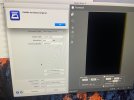
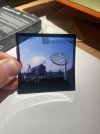
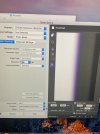
(Attached photos show scanned image of black 5, pictures of plate with 50p coin for scale and settings used to scan)
 

Attachments

  • 3b0db352-70e7-43d0-8015-d42c89f7d80e.jpeg
    3b0db352-70e7-43d0-8015-d42c89f7d80e.jpeg
    54.4 KB · Views: 18
  • 6706a642-896f-4198-8ce4-55f2714d9de7.jpeg
    6706a642-896f-4198-8ce4-55f2714d9de7.jpeg
    176 KB · Views: 15
  • fc44a27f-6c6a-49e6-9707-cd0835ece5f1.jpeg
    fc44a27f-6c6a-49e6-9707-cd0835ece5f1.jpeg
    139.7 KB · Views: 18
  • f5a5239d-aa81-4ca5-9aa3-fe8f6137f978.jpeg
    f5a5239d-aa81-4ca5-9aa3-fe8f6137f978.jpeg
    250.3 KB · Views: 18

BeeBus

Member
Joined
19 Mar 2024
Messages
68
Location
Oldham
With the Epson Scan software you need to set Document Source to "Transparency Unit" and Document Type to "B&W negative film". You also need to keep it clear of the edge of the glass nearest the hinge by about 25mm/one inch as the scanner looks for information from the film holder and if you block it, it will still think it's a document. (On further checking, it's less than that, about 10mm. There should be a distance pice that came with the scanner which helps with this - it looks like a greatly extended (sideways) black plastic 'H'

For trials you can use 300dpi but for a proper scan you should go for a higher resolution - with that size of plate I would suggest 1200 or 2400dpi -EDIT, probaly 600 or 1200dpi on reflection.

Finally a note of caution - the glass plates can scratch the glass bed of the scanner so need placing with great care (and should be with the emulsion - matt - side down). If you have many to do and they're all the same size I would suggest making a card mask so you are placing the plate on card instead of glass. This also helps the focussing of the image and removes the risk of Newtons Rings, a pattern on the image that you don't want that is very difficult to remove in Photoshop.

Another addition! On the Epson Scan window there is a "Thumbnail" box which I would uncheck. This detects images automatically but crops some of the image in the process, so I never use it. The cropping effect may be quite limited with a glass plate so it may not matter so much. What you then have to do is to draw a box (called a marquee) round the part of the image you want to scan to select it and the scanner then only scans that defined area. You could do multiple areas if you want, useful for strips of 35mm but less so for glass plates. There will be a box appears above the AUTO (-Exposure) symbol which tells you how many marquees you have created and if you want to scan them all you need to click on that.

Finally, I would suggest putting the glass plate so one edge is up against the ridge at the edge of the glass bed which will mean your scan will be as square as possible, helping with future processing.
 
Last edited:

8ace

Member
Joined
25 Dec 2019
Messages
270
Location
Brighton
Thanks for responding, connectivity issues have prevented me from posting this reply sooner. I took on board your advice about potentially scratching the scanner so fashioned a mask out of some card my uncle found. Does the card have to be white as it didn’t seem to work with the grey/brown (pictured) stuff we used. The error was the unable to detect original pictured.
 

Attachments

  • b9d2a868-2c9f-481e-a35e-8d78d817d4d0.jpeg
    b9d2a868-2c9f-481e-a35e-8d78d817d4d0.jpeg
    223.5 KB · Views: 4
  • b3c263d6-1995-4714-bc0b-57d9f79c7a8a.jpeg
    b3c263d6-1995-4714-bc0b-57d9f79c7a8a.jpeg
    199.3 KB · Views: 4

8ace

Member
Joined
25 Dec 2019
Messages
270
Location
Brighton
Next we tried scanning some film transparencies as I was getting frustrated with the glass plates. I tried the image in a variety of places on the scanner but always end up something like the following. The transparency is a colour positive so the settings seem correct to me? (I wish this thing came with a better instruction manual)
 

Attachments

  • af8d3cf9-3afe-4721-a049-501ee34d40ff.jpeg
    af8d3cf9-3afe-4721-a049-501ee34d40ff.jpeg
    177.8 KB · Views: 12
  • fe0996f9-4e2a-4644-85f2-c0508e73615d.jpeg
    fe0996f9-4e2a-4644-85f2-c0508e73615d.jpeg
    255.3 KB · Views: 10

BeeBus

Member
Joined
19 Mar 2024
Messages
68
Location
Oldham
Hmm, I've never had the "Unable to detect image" message. I think it is normally related to automatic image area selection, but from what I can see from your image with the error message you have disabled that.

Have you checked the operation of the light in the transparency hood (the lid!)? And an obvious question - have you removed the cover that is slotted in there for when you are doing prints/documents? You can check the operation of the light by clicking on Preview (when in photo mode) with the lid up - you can see the light and you can cancel the scan as soon as you've satisfied yourself it works.

Having tried a few permutations I have managed to get the "Unable to detect image" when I had disconnected the lead to the lid, so I would check that. It didn't happen with the cover still on, so I don't think that's the cause. You will pick up these things quite quickly, they're obvious when the number of scans you've done is well into five figures! However, you only do them once - in the case of my scanner about ten years ago - and then promptly forget what you've done!

When (hopefully not if) you start to get on top of things a very useful tip is to save each of your preferred scan settings - for example I have 35mm, 120 and 5" x 4" settings for B&W negatives, colour negatives and transparencies, plus others for documents/prints. If you look at the scan settings drop down you will see an ability Save Scan Settings, once you have decided yourself what they need to be. This will include also the filename, file type and location. It's very useful once you get going.
 

8ace

Member
Joined
25 Dec 2019
Messages
270
Location
Brighton
Hadn’t removed the cover what an idiot :lol:
Thank you very much for all your advice @BeeBus will crack on and report back. :)
 

BeeBus

Member
Joined
19 Mar 2024
Messages
68
Location
Oldham
Sometimes the bleeding obvious isn't as obvious as you think! Happy to help more once you're into it more.
 

BeeBus

Member
Joined
19 Mar 2024
Messages
68
Location
Oldham
Sorry, I realise I have advised you wrongly on which way up to put the glass plates, they should be emulsion side UP. That's the same way as for all the film formats supported by the film holders that came with the scanner, which of course are no use for glass plates.

It's also worth mentioning that you need to pay attention to the height adjustment on the film holders as the focussing is quite critical. The best approach is to do test scans with all in the same of each of the five positions and check which gives the sharpest and make sure you always use that setting. They easily change position through handling! Obviously your card mount for glass plates doesn't have this adjustment.

As I tried to stress before, it really is worth getting the set-up correct before you get into the business of scanning in quantity.
 

8ace

Member
Joined
25 Dec 2019
Messages
270
Location
Brighton
Ok thanks am tinkering with a few things before planning to do it all on Sunday. House is very dusty and need to get some gloves for my grubby fingerprints. Your updated info makes sense as the good scan I had was reversed with emulsion down.
 

Harpers Tate

Established Member
Joined
10 May 2013
Messages
2,033
I think that if you are going to use a conventional* flatbed scanner to scan a transparency then you are unlikely to get good results. Despite what was said earlier, if there are paper prints available, these will probably be a better choice.

First: Transparencies really need to have a light shone through them, rather than at them. They aren't intended to reflect light back the way it came, they are intended to modulate the (even) amount of light as it passes through. (Think about looking at slides with the naked eye; you can't see them clearly unless you hold them up to the light and look through them; your basic scanner can't do that and will see something like what you see if you try and view a slide on a piece of paper on a desk).

If you try to correct this by (say) scanning against a white background the light source will pass through the film to the background and then back again. In so doing , it will "project" an image onto the white background. The "projected" image on the background will form part of the scanned file and, especially if that background is not right next to the film, may appear like double/ghost image.

Second: if there is any kind of frame for the transparency then it won't be right on the scanner glass.. Many scanners do not have any depth of field meaning that anything that is not right on the glass will be "out of focus".

Had these been conventional film sizes then there are some pretty good flatbed scanners out there (mine's a Canon) which are designed for scanning transparencies/films. They (a) have very good depth of field, meaning that the scan is in focus when away from the glass by a few mm. and (b) have a light source in the lid as well as under the glass and when scanning transparency it is the lid light (only) that is lit, thus shining through, not at, the film. My Canon's lid light source does not, however extend the whole bed; it's only wide enough to do up to something like 120 roll film negatives. If I were scanning plates like these, I'd have to do each one in narrow strips and then stitch them together manually (eg in Photoshop). There are also dedicated film scanners, but again these are typically limited to conventional film sizes.

I have no knowledge of any transparency ("through") scanners suitable for direct and complete scan of larger plates. I guess there will be some, somewhere.

=================================================================================
* by conventional, I mean one where the light source and the scanning sensor are on the same side of the material being scanned
=================================================================================

To illustrate what is "wrong" with using a conventional scanner, I have taken your first direct scan and inverted it both to positive and laterally and briefly tweaked the contrast so you can see how indistinct and flawed it is. And done the same positive and contrast tweaks with your direct photograph (fingerprints and all) for comparison. At the very least, the blurring should be evident.

black5scan.jpgblack5photo.jpg
 

etr221

Established Member
Joined
10 Mar 2018
Messages
1,579
I think that if you are going to use a conventional* flatbed scanner to scan a transparency then you are unlikely to get good results. Despite what was said earlier, if there are paper prints available, these will probably be a better choice.
<snip>
=================================================================================
* by conventional, I mean one where the light source and the scanning sensor are on the same side of the material being scanned
=================================================================================
I think the scanner in question has been revealed as an Epson V800 or V850, which has the ability for transmissive scanning (light source and sensor on opposite sides), and the OP and BeeBus have sorted this issue out.

I came upon this (https://www.eachmoment.co.uk/blog/g...hat-to-do-with-edwardian-and-victorian-family) posted by a scanning company as to how they do it (using a V850) - probably worth a read - the key seems to be they have a special holder for the plates being scanned: whether they can or will point the OP in the right direction to obtain one I've no idea. While the V800/V850 are no longer available new from Epson, the support webpages are still there, again I've no idea whether more individual support is available.
 

BeeBus

Member
Joined
19 Mar 2024
Messages
68
Location
Oldham
The Epson V800/V850 has a much larger transparency hood than earlier ones, about A4 dimensions. Prior to getting mine I had tried scanning whole plate (8.5" x 6.5") plates and had to do in two sections as Harpers Tate suggested. However, this is far more difficult than it first seems. Apart from having to get the exposure identical on each scan, getting them both in exactly the same alignment is very tricky. It was very straightforward with the later scanner and the results can be incredible! (As can the file sizes!)
 

Top