• Our new ticketing site is now live! Using either this or the original site (both powered by TrainSplit) helps support the running of the forum with every ticket purchase! Find out more and ask any questions/give us feedback in this thread!

RealTimeTrains website

Sponsor Post - registered members do not see these adverts; click here to register, or click here to log in
R

RailUK Forums

Class15

Established Member
Joined
30 Dec 2021
Messages
4,211
Location
North London or Mildmay line
So basically,

The DF thing actually worked for a while - after the Freightliner split the intermodal side took DF. This was shown separately on RTT, so @Freightmaster - actually it’s not so ridiculous as DF was shown individually for several months (I think May - September?). It’s now switched back to FL for some reason, so the RTT thing doesn’t work again.
 

Freightmaster

Verified Rep
Joined
7 Jul 2009
Messages
4,531
So basically,

The DF thing actually worked for a while - after the Freightliner split the intermodal side took DF. This was shown separately on RTT, so @Freightmaster - actually it’s not so ridiculous as DF was shown individually for several months (I think May - September?).

For clarification, I was pointing out that just because a FOC has a two character 'TOC' identifier
doesn't mean that RTT is able to show loco/stock details like the passenger TOCs.

Another recent example is [PX] for Europhoenix - a TOC code, but no loco allocations available.

It’s now switched back to FL for some reason, so the RTT thing doesn’t work again.

Freightliner trains come up as [ZZ] for me on RTT, not FL?
 

50002Superb

Established Member
Joined
18 Aug 2021
Messages
2,159
Location
Nottingham
Not new - it's been like that for a few months now but for clarification, Freightliner are definitely not a TOC;
all 'new' FOCs are given a two letter operator code by default these days.


Nice try!! :lol:
The drop down box in RTT refers to them collectively as a TOC so I used that acronym so that others could find what I was referring to.
 

Freightmaster

Verified Rep
Joined
7 Jul 2009
Messages
4,531
The drop down box in RTT refers to them collectively as a TOC so I used that acronym so that others could find what I was referring to.

Fair enough! 8-)

As 'class 15' mentioned, Freightliner was (erroneously?) given a TOC code when it was split off from
Heavy Haul Rail earlier in the year which is why there is an option in the RTT 'drop down' list of TOCs,
even though Freightliner train now correctly show up as ZZ.

Railcam shows the individual FOCs (FL, Colas, DRS, DB, etc) correctly because I created a database
which categorises all freight schedules trains by their TSC and cross-references it to show the FOC.


MARK

 
Last edited:

Tom

Member
Joined
19 Jan 2008
Messages
873
Location
35,000ft
I don't believe the allocation was erroneous and is standard approach now but I will need to do some digging as to why as they've reverted to ZZ - I was informed it was a permanent arrangement when I asked NR when it first happened.
 

chrisjo

Member
Joined
18 May 2024
Messages
612
Location
Llanishen
It came up as ETCS test trains out of Welwyn GC FD from the last few days
I didn't realise that there were TOCs that could appear in a list of schedules, but not be available for selection in the drop-down list of TOCs in the search menu. Now I know, I wonder how many others there are?
 

ExRes

Established Member
Joined
16 Dec 2012
Messages
8,500
Location
Back in Sussex
I didn't realise that there were TOCs that could appear in a list of schedules, but not be available for selection in the drop-down list of TOCs in the search menu. Now I know, I wonder how many others there are?

Hanson & Hall 'YG' was unavailable for some time but is listed now, EPR 'PX' is not showing as yet, the biggest bugbear being that FOCs are just shown as 'ZZ'
 

Peter Mugridge

Veteran Member
Joined
8 Apr 2010
Messages
17,861
Location
Oakham
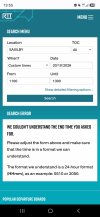
OK... I'm trying to puzzle out what I did wrong here...?
 

Attachments

  • Screenshot_20261017_135531_Chrome.jpg
    Screenshot_20261017_135531_Chrome.jpg
    386.4 KB · Views: 125

Tom

Member
Joined
19 Jan 2008
Messages
873
Location
35,000ft
If you see that, we really need to see the URI in the address bar rather than a screenshot to work out why it's said it.
 

blue87

Member
Joined
21 Mar 2008
Messages
139
On Avanti some earlier services in the trains diagram show allocations for instance the 0506 Wolverhampton to Euston 1B99 has no allocation but the ECS from Oxley 5B99 that forms it does.
 

IanXC

Emeritus Moderator
Joined
18 Dec 2009
Messages
6,616
OK... I'm trying to puzzle out what I did wrong here...?
In my experience if you end up with the whole name in capitals it isn't going to work. Close the window, try again, and select the location which is in sentance case and you have a good chance of success.
 

Peter Mugridge

Veteran Member
Joined
8 Apr 2010
Messages
17,861
Location
Oakham
If you see that, we really need to see the URI in the address bar rather than a screenshot to work out why it's said it.
Sorry, I could only do a screenshot - I'm limited to using my phone at the moment ( moved, awaiting fibre connection installation ) and that's all I can do as a grab.

In my experience if you end up with the whole name in capitals it isn't going to work. Close the window, try again, and select the location which is in sentance case and you have a good chance of success.
It autofilled it like that when I touched the drop down list after typing the first three letters.
I've seen that a few times recently but a refresh always made it go away.
I simply closed the whole tab and reopened to try again.
 

chrisjo

Member
Joined
18 May 2024
Messages
612
Location
Llanishen
Weirdly, it changes the case of the station name to upper case if you select Custom Times AND also give it a time in an incorrect format. There's a space after 1300 in this search.
1792271550788.png
Edit: Above on phone, below on PC:

1792271991072.png
 
Last edited:

Top