• Our new ticketing site is now live! Using either this or the original site (both powered by TrainSplit) helps support the running of the forum with every ticket purchase! Find out more and ask any questions/give us feedback in this thread!

One for the tech guys?

Status
Not open for further replies.

RSDonovan

Member
Joined
25 Oct 2019
Messages
47
Location
Hove
I’m not sure if this is the correct forum, please advise if not and I’ll move it.

i want a plain text file containing all the three letter station abbreviation codes eg. STP EUS HOV ECR etc. as plain text I have seen many links that lead to spreadsheets etc. but I just need a text file, either undelimited eg STPEUSHOVECR or delimited eg STP,EUS,HOV,ECR or similar. I can deal with line feeds but only if they are consistent.

I hope someone will be able to help me!

Thanks in advance
 
Sponsor Post - registered members do not see these adverts; click here to register, or click here to log in
R

RailUK Forums

The_Train

Established Member
Joined
2 Jun 2018
Messages
5,247
I'm no expert but is it not just possible to save one of the spreadsheets you've been linked to as a .txt file?
 

RSDonovan

Member
Joined
25 Oct 2019
Messages
47
Location
Hove
I'm no expert but is it not just possible to save one of the spreadsheets you've been linked to as a .txt file?
Unfortunately not. There are loads of embedded control characters that would be almost impossible to unscramble! Thanks anyway
 

ComUtoR

Established Member
Joined
13 Dec 2013
Messages
9,562
Location
UK
Would a csv file help ?

== Doublepost prevention - post automatically merged: ==

I have the original CSV and converted it to tab delimited but its ugly as sin. The forum doesnt allow .csv uploads. Just uploaded a slightly better version. Just a few tabs out of alignment.
 

Attachments

  • station_codes-_07-12-2020_.txt
    72.9 KB · Views: 18
Last edited:

RSDonovan

Member
Joined
25 Oct 2019
Messages
47
Location
Hove
Hi! In what way is it “ugly as sin”? I’m trying to avoid too much processing. What if you just saved it as a .txt file?
 

SargeNpton

Established Member
Joined
19 Nov 2018
Messages
1,717
Can you not just open up one of the spreadsheets, highlight the column that contains the CRS codes, then copy & paste that into a new text file?
 

RSDonovan

Member
Joined
25 Oct 2019
Messages
47
Location
Hove
Would a csv file help ?

== Doublepost prevention - post automatically merged: ==

I have the original CSV and converted it to tab delimited but its ugly as sin. The forum doesnt allow .csv uploads
I now see that it looks like a saved spreadsheet file. It still contains all the spreadsheet control characteristics which I am trying to avoid. Thanks anyway

== Doublepost prevention - post automatically merged: ==

Can you not just open up one of the spreadsheets, highlight the column that contains the CRS codes, then copy & paste that into a new text file?
I don’t have a spreadsheet program!
 

pelli

Member
Joined
15 Sep 2016
Messages
356
You can use Google Sheets online if you don't want to install a free spreadsheet program such as LibreOffice Calc.

For example, National Rail Enquiries publishes their list here: https://www.nationalrail.co.uk/stations_destinations/48541.aspx . You can download the CSV file and open it in Google Sheets online, and extract the data you want. Also, in fact, you can just select and copy the entire table on the web page and paste into Google Sheets, then copy out the second column only into your text file (which is what I've done to get the attached file).

Edit: The web page is dated 5 Aug 2020 while the CSV file is dated 7 Dec 2020, but the only difference between the two is that the CSV file contains Okehampton twice.
 

Attachments

  • stationcodes.txt
    12.6 KB · Views: 5
Last edited:

ComUtoR

Established Member
Joined
13 Dec 2013
Messages
9,562
Location
UK
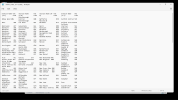
It still contains all the spreadsheet control characteristics which I am trying to avoid.

Only shows as a standard txt file for me. This was opened in notepad. What program are you opening it with ?
 

Attachments

  • Screenshot (111).png
    Screenshot (111).png
    254.7 KB · Views: 36

py_megapixel

Established Member
Joined
5 Nov 2018
Messages
7,453
Location
Northern England
Unfortunately not. There are loads of embedded control characters that would be almost impossible to unscramble! Thanks anyway
I've just copied and pasted the list from the National Rail website and run it through a quick Python script that removes any control characters and then rewrites all the codes into a text file. There should not be any line breaks in this (except perhaps at the end), just the codes and delimiters. Is this suitable for your use?
 

Attachments

  • crs_codes.txt
    10.1 KB · Views: 18

37078xotTE

Established Member
Joined
29 Feb 2012
Messages
2,840
I’m not sure if this is the correct forum, please advise if not and I’ll move it.

i want a plain text file containing all the three letter station abbreviation codes eg. STP EUS HOV ECR etc. as plain text I have seen many links that lead to spreadsheets etc. but I just need a text file, either undelimited eg STPEUSHOVECR or delimited eg STP,EUS,HOV,ECR or similar. I can deal with line feeds but only if they are consistent.

I hope someone will be able to help me!

Thanks in advance
 

Attachments

  • Station codes (all).xlsx
    67 KB · Views: 2

RSDonovan

Member
Joined
25 Oct 2019
Messages
47
Location
Hove
You can use Google Sheets online if you don't want to install a free spreadsheet program such as LibreOffice Calc.

For example, National Rail Enquiries publishes their list here: https://www.nationalrail.co.uk/stations_destinations/48541.aspx . You can download the CSV file and open it in Google Sheets online, and extract the data you want. Also, in fact, you can just select and copy the entire table on the web page and paste into Google Sheets, then copy out the second column only into your text file (which is what I've done to get the attached file).

Edit: The web page is dated 5 Aug 2020 while the CSV file is dated 7 Dec 2020, but the only difference between the two is that the CSV file contains Okehampton twice.
That’s brilliant thanks a lot
 

RailAleFan

Member
Joined
2 Jul 2014
Messages
337
Location
Midlands
You can use Google Sheets online if you don't want to install a free spreadsheet program such as LibreOffice Calc.

For example, National Rail Enquiries publishes their list here: https://www.nationalrail.co.uk/stations_destinations/48541.aspx . You can download the CSV file and open it in Google Sheets online, and extract the data you want. Also, in fact, you can just select and copy the entire table on the web page and paste into Google Sheets, then copy out the second column only into your text file (which is what I've done to get the attached file).

Edit: The web page is dated 5 Aug 2020 while the CSV file is dated 7 Dec 2020, but the only difference between the two is that the CSV file contains Okehampton twice.

Having seen the date I thought i'd double check and the National Rail Enquiries CSV is missing a couple of the more recent openings...

Bow Street (BOW)
Kintore (KTR)
Soham (SOJ)
 

RSDonovan

Member
Joined
25 Oct 2019
Messages
47
Location
Hove
I've just copied and pasted the list from the National Rail website and run it through a quick Python script that removes any control characters and then rewrites all the codes into a text file. There should not be any line breaks in this (except perhaps at the end), just the codes and delimiters. Is this suitable for your use?
That is absolutely brilliant thanks a million
 
Status
Not open for further replies.

Top