• Our new ticketing site is now live! Using either this or the original site (both powered by TrainSplit) helps support the running of the forum with every ticket purchase! Find out more and ask any questions/give us feedback in this thread!

Computer Speed

Status
Not open for further replies.

Butts

Veteran Member
Joined
16 Jan 2011
Messages
11,866
Location
Stirlingshire
If that is the euphemism I think it is could you have picked up some malware?

No I regularly view images (both still and moving) of "Classic Artworks" :lol:
--- old post above --- --- new post below ---
I wouldn't suggest, in that case, going for Linux. Whilst it's go a lot better in terms of usability it's still a bit niche really.

Thanks...
 
Sponsor Post - registered members do not see these adverts; click here to register, or click here to log in
R

RailUK Forums

Clip

Established Member
Joined
28 Jun 2010
Messages
10,821
Your spec looks fine as others have said but you can get a computer shop to up your RAM to about 4GB for about 50 notes or so.

BUT, you should also do a clean out before you think of reformatting as you probably havent done one for a while if at all have you?

Download the latest version of CCLEANER then run it straight away.

Download MALWAREBYTES then update it BEFORE you scan then give it a full scan which will take a while. Fix anything it brings up and then reboot your computer staright away.

First download avast IMO its the best and lightest AV software out there

Now uninstall ALL your security software and any 3rd party programem you may have like any sort of defraggers or other spyware finding progs.

Now install avast but untick any of the options in there as you dont need them - been a while since I done a fresh install of avast so not sure if it still comes with any.

Install and run startuplite, accept suggested changes. This will speed up your computer from cold when you boot up.

Let us know how you get on then get back to us if still sluggish.

Then get down the shop sometime and get more RAM and may go back to Win XP or even Win 7 - the PC shop could do this for you.


Its pretty straight forward and easy stuff which should speed you up a wee bit.
 

Butts

Veteran Member
Joined
16 Jan 2011
Messages
11,866
Location
Stirlingshire
Your spec looks fine as others have said but you can get a computer shop to up your RAM to about 4GB for about 50 notes or so.

BUT, you should also do a clean out before you think of reformatting as you probably havent done one for a while if at all have you?

Download the latest version of CCLEANER then run it straight away.

Download MALWAREBYTES then update it BEFORE you scan then give it a full scan which will take a while. Fix anything it brings up and then reboot your computer staright away.

First download avast IMO its the best and lightest AV software out there

Now uninstall ALL your security software and any 3rd party programem you may have like any sort of defraggers or other spyware finding progs.

Now install avast but untick any of the options in there as you dont need them - been a while since I done a fresh install of avast so not sure if it still comes with any.

Install and run startuplite, accept suggested changes. This will speed up your computer from cold when you boot up.

Let us know how you get on then get back to us if still sluggish.

Then get down the shop sometime and get more RAM and may go back to Win XP or even Win 7 - the PC shop could do this for you.


Its pretty straight forward and easy stuff which should speed you up a wee bit.

Thanks I will have to get my Son up to sort this out :oops:
 

Clip

Established Member
Joined
28 Jun 2010
Messages
10,821
Ha ha no worries. It really is very straight forward
 

tony_mac

Established Member
Joined
25 Feb 2009
Messages
3,626
Location
Liverpool
Your spec looks fine as others have said but you can get a computer shop to up your RAM to about 4GB for about 50 notes or so.
I think the maximum is 2gb on this model - Crucial sell 1gb sticks for £12 each (or £25 for a pair!).

What anti-virus software is installed?
 

tony_mac

Established Member
Joined
25 Feb 2009
Messages
3,626
Location
Liverpool
I am curious as to how much memory Norton uses. The last time I used it (years ago) it was pretty bloated.

If you bring up the task manager (right-click on an empty space at the very bottom of the screen and choose 'start task manager')
then click on 'processes' and look to see what the memory usage of Norton is (if you can find it).

If you click on the 'memory' tab, then you can sort the running tasks by their memory usage, and see what is taking up lots.

(I actually use Microsoft Security essentials anti-virus. Perhaps surprisingly, it has been the most reliable and light-weight anti-virus software that I have used).
 

SS4

Established Member
Joined
30 Jan 2011
Messages
8,589
Location
Birmingham
I am curious as to how much memory Norton uses. The last time I used it (years ago) it was pretty bloated.

If you bring up the task manager (right-click on an empty space at the very bottom of the screen and choose 'start task manager')
then click on 'processes' and look to see what the memory usage of Norton is (if you can find it).

If you click on the 'memory' tab, then you can sort the running tasks by their memory usage, and see what is taking up lots.

(I actually use Microsoft Security essentials anti-virus. Perhaps surprisingly, it has been the most reliable and light-weight anti-virus software that I have used).

MSE is pretty good, I use it in my VM.

Hey hang on I paid £24 for it - from would you believe Comet :lol:

Looks like you've learnt an important lesson :lol: although I've not really used Norton. Avast is also good IIRC.
 

Butts

Veteran Member
Joined
16 Jan 2011
Messages
11,866
Location
Stirlingshire
MSE is pretty good, I use it in my VM.


Looks like you've learnt an important lesson :lol: although I've not really used Norton. Avast is also good IIRC.

God I can't keep up is this Comet, DOO or East Coast Catering or anything to do with Smoking :roll:
 

bb21

Emeritus Moderator
Joined
4 Feb 2010
Messages
24,474
Hey hang on I paid £24 for it - from would you believe Comet :lol:

Moral of the story - don't pay for anti-virus. There are plenty of decent free ones around which you can pick from.
 

wintonian

Established Member
Joined
15 Jan 2010
Messages
4,889
Location
Hampshire
Moral of the story - don't pay for anti-virus. There are plenty of decent free ones around which you can pick from.

I used to buy last years Kaspersky for around £10 for 3 licences from Amazon, it's upgradeable to the current version and of course the database stays up-to-date for the length of the licence anyway.

Now I primarily run Kubuntu and Xubuntu I have no need for such things.
--- old post above --- --- new post below ---
I didnt really look it up but for what Butts uses the comp for that should do really.


Get rid.

I agree I tried it once 1o years ago; its idea of internet security was to prevent all access to the internet and I could only regain access without consent error dialogues popping up was to reformat and reinstall.

NEVER again. :-x
 

LE Greys

Established Member
Joined
6 Mar 2010
Messages
5,389
Location
Hitchin
Your spec looks fine as others have said but you can get a computer shop to up your RAM to about 4GB for about 50 notes or so.

BUT, you should also do a clean out before you think of reformatting as you probably havent done one for a while if at all have you?

Download the latest version of CCLEANER then run it straight away.

Download MALWAREBYTES then update it BEFORE you scan then give it a full scan which will take a while. Fix anything it brings up and then reboot your computer staright away.

First download avast IMO its the best and lightest AV software out there

Now uninstall ALL your security software and any 3rd party programem you may have like any sort of defraggers or other spyware finding progs.

Now install avast but untick any of the options in there as you dont need them - been a while since I done a fresh install of avast so not sure if it still comes with any.

Install and run startuplite, accept suggested changes. This will speed up your computer from cold when you boot up.

Let us know how you get on then get back to us if still sluggish.

Then get down the shop sometime and get more RAM and may go back to Win XP or even Win 7 - the PC shop could do this for you.


Its pretty straight forward and easy stuff which should speed you up a wee bit.

I'm currently about half-way through most of this, and although I've just accidentally deleted my browser history when I was in the middle of reading the Apollo Lunar Surface Journal (somewhat annoying), it sounds like good advice. I also ran a connection speed test, and to came back with 500Mb. We still rely on a 1960s copper telephone line.
 

Clip

Established Member
Joined
28 Jun 2010
Messages
10,821
Oops sorry LE Greys I forgot to mention to bookmark any history you want saving first as CCleaner gets rid of it all.
 

maniacmartin

Established Member
Fares Advisor
Joined
15 May 2012
Messages
5,438
Location
Croydon
The maximum official amount of memory (RAM) that the computer can take is 2GB (probably 2x1GB sticks), of type DDR2. Your current 1GB may be made up of 2x512MB sticks which would mean binning them both to upgrade to 2GB. Even if so, I would still do this as its cheap and 1GB is quite tight for Vista. http://www.crucial.com/uk have a tool that'll automatically tell you what you need.

As requested, here's the "clear english" to what I suspect your problem is :)

Its not a simple linear relationship between RAM (memory) size and the speed of the computer. The RAM is the computer's working memory, where it keeps all the things that are currently open, such as Windows, your web pages, email client etc. Think of it like a desk where you can spread your paperwork that you are working on. With a bigger desk, you can look at more paperwork at once.

If you open more applications (or bigger ones) than can fit in your computer's RAM, then this is the equivalent of running out of room on the desk. The computer then has to clear some stuff out and store it temporarily on the hard drive (long term memory), which is much bigger but also much slower to access - equivalent of taking some of your papers to a filing cabinet down the hallway. If you then switch to the program that it happens to have cleared out to make room, you get a lag while it moves something else out to the hard drive to make room, and then fetches the data on the program back from the hard disk. This process is called paging (or swapping to Linux users)

You can prevent this by:
  1. Opening less programs, web pages, etc at the same time, thus using less RAM
  2. Buying more RAM (your machine only supports 2GB sadly)
  3. Switching to a leaner operating system than Windows Vista, as Vista itself consumes RAM when running
  4. Uninstalling cruft, like all the junk that generally sits in the system tray near the clock, which consumes RAM when its running (especially Norton which seems to consume lots more resources than other antivirus programs)

If you never use more than the amount of RAM you have, there will be virtually no speedup to buying more. On the other case, if you use vastly more than you have and switch between programs often, you will see speedups that are much greater (e.g. could be 10x speedup for only doubling the RAM)


PS Since you are on Virgin Media, you may also notice that the speed may not be consistant and if you run speedtest.net you may get a worse speed at peak times due to congestion on their oversold network. Not that I think that is causing your problems.

 
Last edited:

Butts

Veteran Member
Joined
16 Jan 2011
Messages
11,866
Location
Stirlingshire
The maximum official amount of memory (RAM) that the computer can take is 2GB (probably 2x1GB sticks), of type DDR2. Your current 1GB may be made up of 2x512MB sticks which would mean binning them both to upgrade to 2GB. Even if so, I would still do this as its cheap and 1GB is quite tight for Vista. http://www.crucial.com/uk have a tool that'll automatically tell you what you need.

As requested, here's the "clear english" to what I suspect your problem is :)

Its not a simple linear relationship between RAM (memory) size and the speed of the computer. The RAM is the computer's working memory, where it keeps all the things that are currently open, such as Windows, your web pages, email client etc. Think of it like a desk where you can spread your paperwork that you are working on. With a bigger desk, you can look at more paperwork at once.

If you open more applications (or bigger ones) than can fit in your computer's RAM, then this is the equivalent of running out of room on the desk. The computer then has to clear some stuff out and store it temporarily on the hard drive (long term memory), which is much bigger but also much slower to access - equivalent of taking some of your papers to a filing cabinet down the hallway. If you then switch to the program that it happens to have cleared out to make room, you get a lag while it moves something else out to the hard drive to make room, and then fetches the data on the program back from the hard disk. This process is called paging (or swapping to Linux users)

You can prevent this by:
  1. Opening less programs, web pages, etc at the same time, thus using less RAM
  2. Buying more RAM (your machine only supports 2GB sadly)
  3. Switching to a leaner operating system than Windows Vista, as Vista itself consumes RAM when running
  4. Uninstalling cruft, like all the junk that generally sits in the system tray near the clock, which consumes RAM when its running (especially Norton which seems to consume lots more resources than other antivirus programs)

If you never use more than the amount of RAM you have, there will be virtually no speedup to buying more. On the other case, if you use vastly more than you have and switch between programs often, you will see speedups that are much greater (e.g. could be 10x speedup for only doubling the RAM)


PS Since you are on Virgin Media, you may also notice that the speed may not be consistant and if you run speedtest.net you may get a worse speed at peak times due to congestion on their oversold network. Not that I think that is causing your problems.

Thankyou for taking the trouble to explain all the above :p
 

wintonian

Established Member
Joined
15 Jan 2010
Messages
4,889
Location
Hampshire
You can prevent this by:
  1. Opening less programs, web pages, etc at the same time, thus using less RAM
  2. Buying more RAM (your machine only supports 2GB sadly)
  3. Switching to a leaner operating system than Windows Vista, as Vista itself consumes RAM when running
  4. Uninstalling cruft, like all the junk that generally sits in the system tray near the clock, which consumes RAM when its running (especially Norton which seems to consume lots more resources than other antivirus programs)

There is another option which you almost alluded to - Install a mainstream Linux distribution (Ubuntu/ Kubuntu) or a light weight one that will preform better on older hardware i.e. Xubuntu, which I highly recommend for laptops and old systems. There are hundreds of other flavours but those are the mos common ones.

However most Windows users are like Apple fans and wouldn't consider using anything else - I guess they like being dictated to by the Microsoft Apple et al. ;)
 

Butts

Veteran Member
Joined
16 Jan 2011
Messages
11,866
Location
Stirlingshire
There is another option which you almost alluded to - Install a mainstream Linux distribution (Ubuntu/ Kubuntu) or a light weight one that will preform better on older hardware i.e. Xubuntu, which I highly recommend for laptops and old systems. There are hundreds of other flavours but those are the mos common ones.

However most Windows users are like Apple fans and wouldn't consider using anything else - I guess they like being dictated to by the Microsoft Apple et al. ;)

Ubuntu....Kubuntu.....no wonder I get confused - they sound like African Towns or Tribes :oops:
 

wintonian

Established Member
Joined
15 Jan 2010
Messages
4,889
Location
Hampshire
Ubuntu....Kubuntu.....no wonder I get confused - they sound like African Towns or Tribes :oops:

They are all different distributions bases on the Ubuntu distribution.

This or this should help take some of the mystery out of Linux for those who are interested and currently think a shell is something you find on a beach and roots are found on the bottom of organic lifeforms. ;)

According to Ubuntu (which incidentally is owned by Canonical who live on the IoM).

ubuntu |oǒ'boǒntoō|

Ubuntu is an ancient African word meaning 'humanity to others'. It also means 'I am what I am because of who we all are'. The Ubuntu operating system brings the spirit of Ubuntu to the world of computers.
 
Last edited:

maniacmartin

Established Member
Fares Advisor
Joined
15 May 2012
Messages
5,438
Location
Croydon
I did allude to it in my option 3 of a leaner operating system :)
I generally don't recommend non-techies install Linux distributions on their own though, without someone to help backup data and show them how it works.

(Typed from my CentOS 5 workstation at work....)
 

Butts

Veteran Member
Joined
16 Jan 2011
Messages
11,866
Location
Stirlingshire
I did allude to it in my option 3 of a leaner operating system :)
I generally don't recommend non-techies install Linux distributions on their own though, without someone to help backup data and show them how it works.

(Typed from my CentOS 5 workstation at work....)

Thanks....would anyone believe I did a Computer Studies A-Level over thirty years ago :lol:

The only access we had to a Computer was an online "teleprinter" connected to the Open University - yes no VDU's or other such devices. We used to write programmes in "basic" and run them.

Mostly we learnt about Charles Babbage and the History of Computing...

Ah life was so much simpler...:p
 

wintonian

Established Member
Joined
15 Jan 2010
Messages
4,889
Location
Hampshire
I did allude to it in my option 3 of a leaner operating system :)
I generally don't recommend non-techies install Linux distributions on their own though, without someone to help backup data and show them how it works.

(Typed from my CentOS 5 workstation at work....)

you have a fair point, however there are some really simple distros now for people coming from Windows like Zorin for instance. However the Ubuntu verity's are more mainstream and better supported, but a user could move from something like Zorin to Kubuntu when they are comfortable with it.

I think a lot depend on the individual user some who enjoy tinkering and learning new things could manage quite well with a dummies book, Ubuntu website and a copy of (K)Ubuntu, while others would need a more assisted approach and possibly a simpler interface.

But in reality once set up mainstream distributions are really quite user friendly these days, the main issue in switching from Windows is that people have the Windows way of doing things so ingrained into them that they have difficulty unlearning and then relearning a different way.

(Typed on my Kubuntu 12.10 main desktop at home) :)
--- old post above --- --- new post below ---
Thanks....would anyone believe I did a Computer Studies A-Level over thirty years ago :lol:

The only access we had to a Computer was an online "teleprinter" connected to the Open University - yes no VDU's or other such devices. We used to write programmes in "basic" and run them.

Mostly we learnt about Charles Babbage and the History of Computing...

Ah life was so much simpler...:p

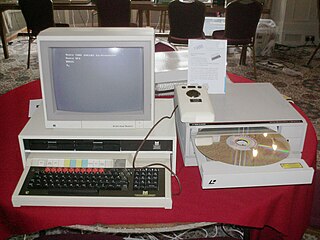
I haven't used BBC basic since Junior school and wouldn't even remember it now.

For the kids this is a BBC computer though when I was at Junior school nobody had heard of a CD yet having only recently been invented.

320px-VCF_2010_Domesday_tray_open.jpg


I feel old. :(
 
Last edited:

Butts

Veteran Member
Joined
16 Jan 2011
Messages
11,866
Location
Stirlingshire
you have a fair point, however there are some really simple distros now for people coming from Windows like Zorin for instance. However the Ubuntu verity's are more mainstream and better supported, but a user could move from something like Zorin to Kubuntu when they are comfortable with it.

I think a lot depend on the individual user some who enjoy tinkering and learning new things could manage quite well with a dummies book, Ubuntu website and a copy of (K)Ubuntu, while others would need a more assisted approach and possibly a simpler interface.

But in reality once set up mainstream distributions are really quite user friendly these days, the main issue in switching from Windows is that people have the Windows way of doing things so ingrained into them that they have difficulty unlearning and then relearning a different way.

(Typed on my Kubuntu 12.10 main desktop at home) :)
--- old post above --- --- new post below ---


I haven't used BBC basic since Junior school and wouldn't even remember it now.

For the kids this is a BBC computer though when I was at Junior school nobody had heard of a CD yet having only recently been invented.

320px-VCF_2010_Domesday_tray_open.jpg


I feel old. :(

You feel old - the OU Terminal makes that BBC one look high tech...ie it's got a screen.

I'm sure cassettes were used to load programmes in the era you refer to. Sinclair ZX Spectrum anyone ?
 

wintonian

Established Member
Joined
15 Jan 2010
Messages
4,889
Location
Hampshire
You feel old - the OU Terminal makes that BBC one look high tech...ie it's got a screen.

I'm sure cassettes were used to load programmes in the era you refer to. Sinclair ZX Spectrum anyone ?

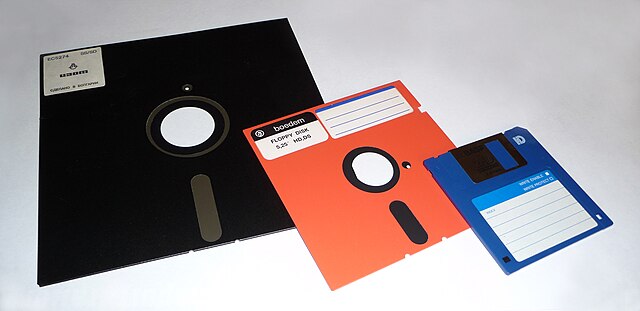
Not quite the BBC was fed with 51/4" floppy's.

Again for the kids like the middle one here though all ours were black:

640px-Floppy_disk_2009_G1.jpg
 

33056

Established Member
Joined
12 Nov 2007
Messages
2,424
Location
On a train somewhere in Europe
For the kids this is a BBC computer though when I was at Junior school nobody had heard of a CD yet having only recently been invented.

320px-VCF_2010_Domesday_tray_open.jpg


I feel old. :(
You feel old? My secondary school had a computer which was a rare thing back in the 1970s; it had a whole room to itself! "Computer Science" wasn't something that was generally available as a subject though, IIRC it was an option you could choose to do from the 3rd or 4th year; German and Latin were two other options that spring to mind.

Anyway, I have finally bitten the bullet and just ordered a new computer as the current one is creaking at the seams, I did consider getting more RAM for it (has 1GB at present) but that would probably be postponing the inevitable as it is eight years old now.
 

SS4

Established Member
Joined
30 Jan 2011
Messages
8,589
Location
Birmingham
To make you all feel slightly older I was only 5 when Debian was first released ;) (August 1993)

For desktops building your own can be a decent idea if you know how but I'm guessing you don't so this is pretty useless. Plus I'm concentrating on watching pointless
 

Butts

Veteran Member
Joined
16 Jan 2011
Messages
11,866
Location
Stirlingshire
To make you all feel slightly older I was only 5 when Debian was first released ;) (August 1993)

For desktops building your own can be a decent idea if you know how but I'm guessing you don't so this is pretty useless. Plus I'm concentrating on watching pointless

What is Debian ? :oops:
--- old post above --- --- new post below ---
R Tape loading error, 0:1.

Indeed - remember the C3 transport thingy :p
 
Status
Not open for further replies.

Top