• Our new ticketing site is now live! Using either this or the original site (both powered by TrainSplit) helps support the running of the forum with every ticket purchase! Find out more and ask any questions/give us feedback in this thread!

Windows 8 Help Request

Status
Not open for further replies.

jon0844

Veteran Member
Joined
1 Feb 2009
Messages
30,841
Location
UK
While it clearly would be mad to install on a work machine or if you're not sure what you're doing, and also one that isn't backed up regularly (or at least where all your documents, pictures, videos etc are backed up in the cloud - e.g. OneDrive or Dropbox), I must say that installing Windows 10 is definitely recommended by me.

It's free until March or April next year (I think) and then it's possible that anyone who already has Windows 8 or 8.1 might get to upgrade free when it's finished.

I was very wary about installing Windows 8, but when Microsoft gave me a copy to review I obviously did - and felt it wasn't for me. 8.1 fixed a lot of things, but Windows 10 is looking really promising and fixes everything (as far as I can see).

All I need now is a decent machine to run it on, as I chose an old EeePC netbook with an ageing Intel Atom CPU, 2GB of RAM and very slow RAM. But even there, it happily outputs full-HD to my TV/monitor and runs pretty well.

(My main daily computer is still a Mac!)
 
Sponsor Post - registered members do not see these adverts; click here to register, or click here to log in
R

RailUK Forums

Peter Mugridge

Veteran Member
Joined
8 Apr 2010
Messages
17,795
Location
Epsom
Does Windows 10 have a "classic look" option - including the use of words rather than symbols on the task bar at the bottom of the screen?
 

Peter Mugridge

Veteran Member
Joined
8 Apr 2010
Messages
17,795
Location
Epsom
Got Windows 7 at work; the symbols plus the way they stack on top of each other are hopelessly confusing! Apparently can't do anything about it, though, but I'd much prefer it to look exactly like the XP version...
 

Baxenden Bank

Established Member
Joined
23 Oct 2013
Messages
4,743
Does Windows 10 have a "classic look" option - including the use of words rather than symbols on the task bar at the bottom of the screen?

Look, you're just the paying customer! Microsoft now runs the world and they have decided what you will have, when, and what it will look like. Their IT gurus like singing and dancing icons and pictures, so you will too! The Sun Valley focus groups all patted themselves on the back for a job well done.

I'm surprised they don't put 'killer' code in old versions of Windows / Office to force people to upgrade more often - just like household electrical goods have a number of weak / cheaply specified components in them so that items expire well ahead of when they ought to (or used to in the good old days).
 

Peter Mugridge

Veteran Member
Joined
8 Apr 2010
Messages
17,795
Location
Epsom
Some printers have killer software in, but totally powering down ( ie unplugging them and then removing the BIOS battery for 10 - 15 minutes ) will fool them into thinking they're brand new again. OK, that wouldn't work with the actual software itself of course, if it was thus limited, but at least you can keep peripherial equipment going that way...
 

jon0844

Veteran Member
Joined
1 Feb 2009
Messages
30,841
Location
UK
Look, you're just the paying customer! Microsoft now runs the world and they have decided what you will have, when, and what it will look like. Their IT gurus like singing and dancing icons and pictures, so you will too! The Sun Valley focus groups all patted themselves on the back for a job well done.

I'm surprised they don't put 'killer' code in old versions of Windows / Office to force people to upgrade more often

The idea now is to get people to subscribe and get continuous updates. Thus, in theory, nobody ever gets left with old software. Likewise, nobody can keep old software (barring applications that can still be purchased outright for as long as that's still possible, or people refuse to update and risk being nagged constantly to update).

Windows 10 is rumoured to be free as an upgrade, or if not will be from then on. OSX now is. Android, iOS and Windows Phone all are.
 

GaryMcEwan

Established Member
Joined
20 Aug 2013
Messages
1,604
Location
Bridgeton, Glasgow
The idea now is to get people to subscribe and get continuous updates. Thus, in theory, nobody ever gets left with old software. Likewise, nobody can keep old software (barring applications that can still be purchased outright for as long as that's still possible, or people refuse to update and risk being nagged constantly to update).

Windows 10 is rumoured to be free as an upgrade, or if not will be from then on. OSX now is. Android, iOS and Windows Phone all are.

Yeah I think it's going to be a free upgrade. One of the rumours going about as well was that Microsoft was going to offer Windows 8/8.1 for free to users that were still on either XP, Vista or 7. But I've not heard anything more about that...
 

455driver

Veteran Member
Joined
10 May 2010
Messages
11,329
I'd much prefer it to look exactly like the XP version...

I quite agree, what was wrong with the look of Win XP with its symbols up the side where they were easy to see, that it had to be binned completely for these new looks?
Poke this, drag that, mouse over the other etc etc!
I just want to click on the bloody thing! <D
--- old post above --- --- new post below ---
One of the rumours going about as well was that Microsoft was going to offer Windows 8/8.1 for free to users that were still on either XP, Vista or 7. But I've not heard anything more about that...
I dont want it anyway, XP all the way for me, my lad has a laptop running win 8 and it is @#+$£%+ horrible.
 

Baxenden Bank

Established Member
Joined
23 Oct 2013
Messages
4,743
Upgrades, upgrades, upgrades. <(

If only I had time to use my laptop for its proper purpose instead of constantly waiting for upgrades to download, install and restart my machine.

Ok, constantly is an large exaggeration, but it would be nice if I was asked if now was a convenient time, or at least advised in advance of such updates, instead of me noticing that my 'online experience' was suddenly reduced for no apparent reason until a message pops up on screen to advise me that 'x' needs to restart my machine to complete the upgrade!

The number of times I have wanted to do a quick bank check or train times check before I leave the house only to find 'something' slowing the process to a crawl and having to leave the house with neither bank check or upgrade completed.
 

jon0844

Veteran Member
Joined
1 Feb 2009
Messages
30,841
Location
UK
I have set my computers to download updates automatically, but that can of course be turned off.

One problem with my MacBook Air is that if I go out and use my EE Mi-Fi (15GB per month) then I don't actually want it to download the latest OSX 10.10.1 update that's 1GB.

Windows now has the ability to set a connection that is metered, although I believe only on Wi-Fi, not Ethernet (goodness knows why Microsoft didn't just allow that too - as my parents run three computers at their office from a Huawei 4G router that is also limited to 15GB per month).

If you've got an unmetered connection and it's fast enough, you can either do the updates on demand or just let them get done in the small hours - but that means stopping the laptop from sleeping overnight.
 

Crossover

Established Member
Joined
4 Jun 2009
Messages
9,492
Location
Yorkshire
Ok, constantly is an large exaggeration, but it would be nice if I was asked if now was a convenient time, or at least advised in advance of such updates, instead of me noticing that my 'online experience' was suddenly reduced for no apparent reason until a message pops up on screen to advise me that 'x' needs to restart my machine to complete the upgrade!

Microsoft Updates mainly come out on "Patch Tuesday" - the second Tuesday in each month. Highly critical updates may be released outside of this window but they are often relatively few and far between

You can also change the time of the updates on each machine too. Our ones at work are set to 10pm by policy, and will either install then or on shutdown if ready to go before. This stops our users getting restart messages in the day

Alternatively you can set it to manual so that it won't even install until you are ready to (which we do with servers to avoid them restarting without some intervention)
 

ilkestonian

Member
Joined
6 Dec 2009
Messages
384
Location
The Potteries
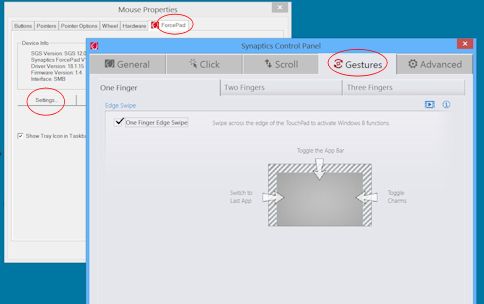
Can you disable the edge-swipe gestures in mouse settings in Control Panel? On my laptop, it's here:

Image4.jpg


Almost certainly slightly different for different hardware though!

I read that this was an option on some laptops, but my Acer has a different (presumably customised) version of this Synaptics driver which doesn't have this option. Tried changing/updating it with no success...
 

Butts

Veteran Member
Joined
16 Jan 2011
Messages
11,814
Location
Stirlingshire
Microsoft Updates mainly come out on "Patch Tuesday" - the second Tuesday in each month. Highly critical updates may be released outside of this window but they are often relatively few and far between

You can also change the time of the updates on each machine too. Our ones at work are set to 10pm by policy, and will either install then or on shutdown if ready to go before. This stops our users getting restart messages in the day

Alternatively you can set it to manual so that it won't even install until you are ready to (which we do with servers to avoid them restarting without some intervention)

This is going to sound absurd....(what's new from me :oops:)

With my Windows 8 every time it resets the system after an update I can't get onto the Internet.

I have to apply system restore to a point before the update - surely this is not normal?
 

Crossover

Established Member
Joined
4 Jun 2009
Messages
9,492
Location
Yorkshire
This is going to sound absurd....(what's new from me :oops:)

With my Windows 8 every time it resets the system after an update I can't get onto the Internet.

I have to apply system restore to a point before the update - surely this is not normal?

No, it definitely isn't normal (even for Microsoft!)
 

Johnuk123

Established Member
Joined
19 Mar 2012
Messages
2,800
This is going to sound absurd....(what's new from me :oops:)

With my Windows 8 every time it resets the system after an update I can't get onto the Internet.

I have to apply system restore to a point before the update - surely this is not normal?

If you're using system restore after every update then you aren't actually ever updating at all. Somehow you've corrupted the operating system, reinstall Win. 8 after backing up whatever.
 

Butts

Veteran Member
Joined
16 Jan 2011
Messages
11,814
Location
Stirlingshire
If you're using system restore after every update then you aren't actually ever updating at all. Somehow you've corrupted the operating system, reinstall Win. 8 after backing up whatever.

The "Norton" is not showing any security breaches :idea:
 

Johnuk123

Established Member
Joined
19 Mar 2012
Messages
2,800
The "Norton" is not showing any security breaches :idea:

A corrupt operating system will not show up as being breached if it hasn't been, you could be missing just one tiny file to have the problems you're having.

Over the years this sort of thing must have happened to me countless times and in the end a reinstall or at least repair will be your best bet as it also gets rid of loads of accumulated rubbish.

https://www.winhelp.us/non-destructive-reinstall-of-windows-8-and-8-1.html see here.
 
Last edited:

Butts

Veteran Member
Joined
16 Jan 2011
Messages
11,814
Location
Stirlingshire

ComUtoR

Established Member
Joined
13 Dec 2013
Messages
9,562
Location
UK
I have windows 8.1 and I have disabled the charms bar.

Even a quick google search comes up with various solutions. Are you still having problems ?
 

Butts

Veteran Member
Joined
16 Jan 2011
Messages
11,814
Location
Stirlingshire
I have windows 8.1 and I have disabled the charms bar.

Even a quick google search comes up with various solutions. Are you still having problems ?

I'm working on it - will probably get my Son to sort it out for me :p
 

ComUtoR

Established Member
Joined
13 Dec 2013
Messages
9,562
Location
UK
Right click task bar
Properties
Navigation Tab
Uncheck Show the Charms bar

You should also edit your trackpad properties as that can have a setting that activate the charms bar and other settings. I removed all my funky trackpad features and that also alleviates frustrations of accidental clicks and gestures.
 

Crossover

Established Member
Joined
4 Jun 2009
Messages
9,492
Location
Yorkshire
By choosing not to install Windows 8, he's doing a good job for his employers though :D

As it is, we have just brought in a Surface Pro 3, which I currently have to play with. I guess I'm going to have to learn Win 8.1 PDQ now :P
 
Status
Not open for further replies.

Top