• Our new ticketing site is now live! Using either this or the original site (both powered by TrainSplit) helps support the running of the forum with every ticket purchase! Find out more and ask any questions/give us feedback in this thread!

Removing logos

Status
Not open for further replies.

43303_43058

Member
Joined
16 Jan 2022
Messages
53
Location
Deep GWR Territory
Hi all,
Was just reskinning a 325 in TS22 when I realised that the RM logos weren’t gone. Is there a way to remove these? At the moment I use a train that’s already unbranded, but that restricts me. Any thoughts?
 
Sponsor Post - registered members do not see these adverts; click here to register, or click here to log in
R

RailUK Forums

Deepgreen

Established Member
Joined
12 Jun 2013
Messages
7,462
Location
Gomshall, Surrey
Hi all,
Was just reskinning a 325 in TS22 when I realised that the RM logos weren’t gone. Is there a way to remove these? At the moment I use a train that’s already unbranded, but that restricts me. Any thoughts?
Is this a modelling question? Otherwise surely your manager must advise.
 

Peter C

Established Member
Joined
13 Oct 2018
Messages
4,739
Location
GWR land
What ? Are you asking. Is it how to remove Logo's and numbers from models.
Sounds, based on the OP, as though they're on about Train Simulator:
Was just reskinning a 325 in TS22 [Train Simulator 2022, and my bold]

@Darandio or @43055 (or one of the many other TS boffins on this forum) might be able to give some more advice?
I think the logos for a train (engine/unit/coach, whatever it may be) are stored as texture files separate from the main livery file - so you'll have to change those to remove them. Just deleting them won't work IIRC.

-Peter
 

BRblue33

Member
Joined
12 Dec 2020
Messages
204
Location
End of the southdowns
Sounds, based on the OP, as though they're on about Train Simulator:


@Darandio or @43055 (or one of the many other TS boffins on this forum) might be able to give some more advice?
I think the logos for a train (engine/unit/coach, whatever it may be) are stored as texture files separate from the main livery file - so you'll have to change those to remove them. Just deleting them won't work IIRC.

-Peter
Are . If that is the case i have not got a clue.:s
 

Darandio

Established Member
Joined
24 Feb 2007
Messages
11,127
Location
Redcar
The logo's on the Class 325 aren't a separate file, they are just part of the main class325_main.TgPcDx file and it would ordinarily look something like this.

325Tex.jpg
 

Peter C

Established Member
Joined
13 Oct 2018
Messages
4,739
Location
GWR land

CR165022

Established Member
Joined
12 Nov 2019
Messages
1,371
Location
Buckinghamshire
this is how i do it:
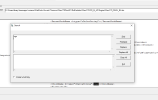
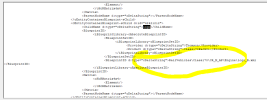
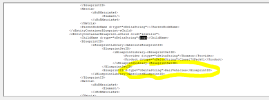
go into the bin files for the train, search for the word logo (it should take you to where the logo is coded in), and removed a part of it
eg it should look something like: \Assets\RSC\Class325Pack01\RailVehicles\Class325\Default\Logo
(i dont have the 325 ep so i dont know what it is specifically)
then delete from where it says the logo file name, to where it says railvehicles
heres an example from a 168 reskin ive done
 

Attachments

  • 1653421326916.png
    1653421326916.png
    21.8 KB · Views: 10
  • 1653421351062.png
    1653421351062.png
    39.2 KB · Views: 10
  • 1653421390905.png
    1653421390905.png
    36.5 KB · Views: 9
Status
Not open for further replies.

Top