
-
Our new ticketing site is now live! Using either this or the original site (both powered by TrainSplit) helps support the running of the forum with every ticket purchase! Find out more and ask any questions/give us feedback in this thread!
You are using an out of date browser. It may not display this or other websites correctly.
You should upgrade or use an alternative browser.
You should upgrade or use an alternative browser.
RealTimeTrains website
- Thread starter Nagora
- Start date


Sponsor Post - registered members do not see these adverts; click here to register, or click here to log in
R
RailUK Forums

hexagon789
Veteran Member
I thought they'd been up a wee while now?Avanti Evero (Class 805 & 807) icons are now up by the looks of it.
View attachment 197359
View attachment 197360
Both images: Cropped screenshots from RealTimeTrains showing newly added icons for the Class 805 & 807 multiple units.
Just the special livery on 807010 has no separate icons, it shows as normal AWC colours.

tfw756rider
On Moderation
Yes, but I seem to recall that the 807 ones came longer after the 807s entered service than the 805 ones did for the 805s (though not quite as long as 756 vs 231).I thought they'd been up a wee while now?
By the way, I just looked at post #1. Not my first time doing so, but isn't it amazing how far Realtime Trains has come along since then! From the old, pre-blue look to all the Know Your Train and RTT+ stuff we have now!
== Doublepost prevention - post automatically merged: ==
I find it amazing that theleast importantfeature of RTT (pictures of trains) is the primary topic of discussion on this thread.
The "pictures of trains" aren't just to look pretty though. They're part of the Know Your Train feature, and provide a visual representation of the train and where in the train its facilities are. Combined with the unit/loco number and the service information/schedule and literal real times, this can actually be very helpful to someone trying to identify the train they plan to travel on.I agree
Last edited:
hexagon789
Veteran Member
You are right, I remember now you've mentioned it that the 805 icon appeared a fair time before the 807s.Yes, but I seem to recall that the 807 ones came longer after the 807s entered service than the 805 ones did for the 805s (though not quite as long as 756 vs 231).
By the way, I just looked at post #1. Not my first time doing so, but isn't it amazing how far Realtime Trains has come along since then! From the old, pre-blue look to all the Know Your Train and RTT+ stuff we have now!
It is indeed, I think I first began using it in around 2015 for running info/platform info but it's come on leaps and bounds since then and is more invaluable that ever really.

If I click on the "Buy tickets from [location] through Realtime Tickets, our ticket portal" from a non-station location, it sets the destination CRS query string to an empty string, which rather curiously puts "Bedford Midland or Bedford St Johns" in the destinaiton box (example).

MerlinRail 804
Member
I find this with the subscription too. A lot of the time, I seem to only be able to go back two weeks when I open the search page. Click on the RTT logo in the top corner to go to the home page and go to the search again from there, usually does the trickThis morning, despite being signed in (registered user, no subscription) I could only seem to go back 2 weeks rather than the 1 month (the 1 month was previously working). Anyone else got this issue too, or just me?
There's an intermittent issue that causes this that we found the cause of a few days ago and it's due to be fixed in the next software update. A refresh of the page should be all that it needs to make it wake up.This morning, despite being signed in (registered user, no subscription) I could only seem to go back 2 weeks rather than the 1 month (the 1 month was previously working). Anyone else got this issue too, or just me?
Glad to hear it is due to be fixed. For some reason refreshing didn't work for me. However link manipulation (looking at the service today, then changing the date) is a temporary workaround - seems to just be an issue with the date picker.There's an intermittent issue that causes this that we found the cause of a few days ago and it's due to be fixed in the next software update. A refresh of the page should be all that it needs to make it wake up.

Peter Mugridge
Veteran Member
I got an instant response just now for a randomly selected 701 035, but this is on computer - I haven't tried on mobile; are you on mobile or computer?Good Morning,
Is anyone else experiencing problems accessing units on RTT where after awhile you only get 408 Request Time Out as the system seems to be going very slowly, any help most welcome please.
Than you in advance.
If you're on mobile, it could be mobile network capacity issues?
Fine on both Mobile & Computer.I got an instant response just now for a randomly selected 701 035, but this is on computer - I haven't tried on mobile; are you on mobile or computer?
If you're on mobile, it could be mobile network capacity issues?
I got an instant response just now for a randomly selected 701 035, but this is on computer - I haven't tried on mobile; are you on mobile or computer?
If you're on mobile, it could be mobile network capacity issues?
Hi Peter,
I'm on a laptop and going via each depot on SWR to get start of day units for my crib, sometimes it works other times get the 408 message.
I rebooted the laptop but still no joy. Any ideas most welcome please.
Thank you
A 408 error would be an error on your end, as it indicates the client has failed to send the full request expected in time. Try a different browser.
(Although once again I make the comment that if you want an official response then contact support.)
(Although once again I make the comment that if you want an official response then contact support.)
A 408 error would be an error on your end, as it indicates the client has failed to send the full request expected in time. Try a different browser.
(Although once again I make the comment that if you want an official response then contact support.)
Thanks Tom, will remember to send an email to RTT next time.

I can't find any way to make it 'wake up' today.There's an intermittent issue that causes this that we found the cause of a few days ago and it's due to be fixed in the next software update. A refresh of the page should be all that it needs to make it wake up.
== Doublepost prevention - post automatically merged: ==
That was yesterday .... and yet today I can fiddle it again by manually entering the date instead of using the calendar picker. Mustn't grumble, eh?I can't find any way to make it 'wake up' today.
Last edited:

I'm not sure if this has been mentioned but the 1U28 1113 Crewe to London Euston https://www.realtimetrains.co.uk/service/gb-nr:W05517/2026-02-17/detailed has the rear coach facing the wrong way
That seems to be a 'feature' of all 350/3 and 350/4 units, at least; but not the 350/1s I've looked at.I'm not sure if this has been mentioned but the 1U28 1113 Crewe to London Euston https://www.realtimetrains.co.uk/service/gb-nr:W05517/2026-02-17/detailed has the rear coach facing the wrong way
I hope Tom has a good 'Anomaly reporting and recording' system.....

Excuse if I'm having a senior moment (which has been happening more and more lately) but if the last carriage is the wrong way round from Crewe to London, my mis understanding must be that the drivers section of coach 8 is facing the rear of coach 7. Is that correct?I'm not sure if this has been mentioned but the 1U28 1113 Crewe to London Euston https://www.realtimetrains.co.uk/service/gb-nr:W05517/2026-02-17/detailed has the rear coach facing the wrong way
Yes it isExcuse if I'm having a senior moment (which has been happening more and more lately) but if the last carriage is the wrong way round from Crewe to London, my mis understanding must be that the drivers section of coach 8 is facing the rear of coach 7. Is that correct?
Last edited:
Well that begs another question when the train leave London Euston!!!Yes it is and no you are not having a senior moment
You all *seem* to be missing the point that the reverse facing carriage will be an error in the RTT display, not a representation of how the train is actually formed!
Looking at the HTML, the rightmost car of the four car set, when it's a 350/3 or 350/4, the PHP code (I assume) behind the webpage is selecting the normal image not the reversed image.
Looking at the HTML, the rightmost car of the four car set, when it's a 350/3 or 350/4, the PHP code (I assume) behind the webpage is selecting the normal image not the reversed image.

bluegoblin7
Established Member
From experience Tom does, it’s called reporting these things to hello@realtimetrains.com. I’ve always had a positive response off one of the team when I’ve raised things.I hope Tom has a good 'Anomaly reporting and recording' system.....
There's an intermittent issue that causes this that we found the cause of a few days ago and it's due to be fixed in the next software update. A refresh of the page should be all that it needs to make it wake up.
We have been doing some more work on this and think we have a fix that removes the competition between the datepicker and the end date validation system; it seems to work about right now. There is a software release planned for Monday that should incorporate this.I can't find any way to make it 'wake up' today.
== Doublepost prevention - post automatically merged: ==
That was yesterday .... and yet today I can fiddle it again by manually entering the date instead of using the calendar picker. Mustn't grumble, eh?
Good to know, thanks for the update and the work to fix this TomWe have been doing some more work on this and think we have a fix that removes the competition between the datepicker and the end date validation system; it seems to work about right now. There is a software release planned for Monday that should incorporate this.

Quenfight
Member
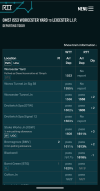
First time I noticed it this afternoon also, very snazzy.Since when did RTT have a dark theme??
Looks good and it was a nice surprise opening it 5 minutes ago!

trainmania100
Established Member
Very sleek. Wonder if this has something to do with the apps coming soon to normalise the appearance on both?
Nope.Wonder if this has something to do with the apps coming soon to normalise the appearance on both?
tfw756rider
On Moderation
I received the email about its introduction at midday today (23/2/26).Since when did RTT have a dark theme??
Looks good and it was a nice surprise opening it 5 minutes ago!