• Our new ticketing site is now live! Using either this or the original site (both powered by TrainSplit) helps support the running of the forum with every ticket purchase! Find out more and ask any questions/give us feedback in this thread!

Printer Ink Cartridge Prices

Status
Not open for further replies.

Butts

Veteran Member
Joined
16 Jan 2011
Messages
11,821
Location
Stirlingshire
I had occasion to be in need of purchasing HP 301 Cartridges for my humble 1510 HP Printer today.

Last time I had to buy them Wilkos was the cheapest place at just under £30 for a twin pack containing the Black and Tri Colour.

This was sometime last year and already represented a hike of about a fiver from my previous purchase.

Imagine my shock today finding that said cartridges are now over FORTY EIGHT QUID.....in Wilkos.

In the end I managed to get them in Currys for £41 with a 20% off HP products.

As far as I can see the cartridges are the same size, so what's going on ?
 
Sponsor Post - registered members do not see these adverts; click here to register, or click here to log in
R

RailUK Forums

SouthernR

Member
Joined
25 Aug 2020
Messages
117
Location
Lancaster
I assume it's supply and demand economics. As printers get old, they die out. Why don't you buy a shiny new one, which happens to need shiny new cartridges. Then we can stop making those old fashioned cartridges.
 

Peter Mugridge

Veteran Member
Joined
8 Apr 2010
Messages
17,808
Location
Epsom
You think that's bad... look at the prices for a laser printer toner cartridge! o_O


( Guess who has one and the toner is about as low as it can get... )
 

Magdalia

Established Member
Joined
1 Jan 2022
Messages
7,356
Location
The Fens
The business model for printers has always been to sell the hardware cheap and then charge a fortune for the refill cartridges.
 

dgl

Established Member
Joined
5 Oct 2014
Messages
3,048
You think that's bad... look at the prices for a laser printer toner cartridge! o_O


( Guess who has one and the toner is about as low as it can get... )
Depends, buy the compatible ones and they can be very cheap, about £40-£50 for a full set of 9,000 page cartridges for my Brother MFC-L8690CDW, you'd need to buy a few standard inkjet cartridges to get the same capacity.

On the inkjet front buying one with separate print heads can make cartridges a fair bit cheaper as they are a lot simpler, even more so with the ones where the tank is inside the printer and the ink comes in bottles.
 

WelshBluebird

Established Member
Joined
14 Jan 2010
Messages
5,580
Would it be too cynical of me to suggest that maybe they are trying to push people to their subscription ink service instead?
(note - I actually use that service and it works very well for me, but I can absolutely see a company being sneaky about trying to push people to a recurring revenue modal for ink as we've seen with lots of other services in the last few years).
 

dgl

Established Member
Joined
5 Oct 2014
Messages
3,048
I think ink costs are a mixture of printers being subsidised and having to make the money back when the purchaser might rarely buy more ink.
More expensive printers generally have more economical ink prices as the printer isn't subsidised in the same way.
 

Bletchleyite

Veteran Member
Joined
20 Oct 2014
Messages
113,120
Location
"Marston Vale mafia"
On the inkjet front buying one with separate print heads can make cartridges a fair bit cheaper as they are a lot simpler, even more so with the ones where the tank is inside the printer and the ink comes in bottles.

This is true until the point when a cheap third party ink cartridge or being unused for a while clogs the printhead, then a new one costs you as much as the printer.

I vastly prefer the type where the printhead is on the cartridge, then that can't happen. They can always be refilled either by yourself or a third party.
 

Ediswan

Established Member
Joined
15 Nov 2012
Messages
3,418
Location
Stevenage
You think that's bad... look at the prices for a laser printer toner cartridge! o_O
On the bright side, laser printers toner doesn't dry out or clog up. My mono laser printer often goes many weeks between use, always works first time.

Another devious practice is selling printers with 'starter' ink/toner cartridges that contains much less than full price replacements.
 

dgl

Established Member
Joined
5 Oct 2014
Messages
3,048
On the bright side, laser printers toner doesn't dry out or clog up. My mono laser printer often goes many weeks between use, always works first time.

Another devious practice is selling printers with 'starter' ink/toner cartridges that contains much less than full price replacements.
That's what I liked about my Brother laser, it came with decent toner in the box, the previous OKI came with toner that can only be used in a new machine as it's missing the chips. The other Good thing about the Brother is that it uses a mechanical toner life mechanism and can be reset, the OKI would just throw a wobbly and refuse to print, sometimes randomly deciding the cartridge was empty.

Oh and don't get me started on laser printer memory upgrades, the amount they can try and charge for either a custom module (that's just a standard laptop style stick with a different connector) or what's simply laptop RAM, the OKI used a custom DDR2 module, the Xerox it replaced sneakily used a standard DDR2 SODIMM with the Xerox upgrades being hundreds or pounds I believe, ended up getting some free 512mb sticks, put one in and it worked just fine. Annoyingly with some printers no memory upgrade can mean a loss of some useful features.
 

Baxenden Bank

Established Member
Joined
23 Oct 2013
Messages
4,743
Shake yes, but no vac. I know somebody who did that once with spilt toner. Went straight through and made an even worse mess.
Yes, the vac was reference to an old TV advert for carpet cleaning powder rather than specifically what you should do with a running down toner cartridge. Just to be QUITE CLEAR, in case anyone rushed off to try it! I also assume it works for printer toner cartridges in the same way it does for photocopier toner cartridges.
 

dgl

Established Member
Joined
5 Oct 2014
Messages
3,048
Yes, the vac was reference to an old TV advert for carpet cleaning powder rather than specifically what you should do with a running down toner cartridge. Just to be QUITE CLEAR, in case anyone rushed off to try it! I also assume it works for printer toner cartridges in the same way it does for photocopier toner cartridges.
Yes, it redistributes the toner in the cartridge reducing light spots, you're supposed to do it to most new cartridges. The technology works in the same way and modern photocopiers are just a scanner and a laser printer.
Some simpler cartridges do not have a roller in the bottom (my OKI and Xerox were like this) and the toner comes out of a hole in the cartridge not onto a page width roller, so shaking them probably has next to no effect.

For example,
With no roller (toner comes out above the gear iirc)
4eb20b59-f82c-4386-8e02-e54001903195_1.76c28d7eced6e96e48a700c2c07cce75.jpeg


With roller,
BROTHER%20TN-446%20Yellow-500x500.png
 
Last edited:

Peter Mugridge

Veteran Member
Joined
8 Apr 2010
Messages
17,808
Location
Epsom
Do the shake and vac, put the blackness back, as I used to sing at work.
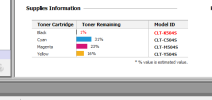
In fairness, I really don't think I can squeeze any more out of it than I already have done...!!! See screenshot below...


Depends, buy the compatible ones and they can be very cheap...
Tried that once with a previous printer only to find it had been programmed to only recognise the bar codes on the genuine products... :(
 

Attachments

  • 1677103668843.png
    1677103668843.png
    10.8 KB · Views: 14

philthetube

Established Member
Joined
5 Jan 2016
Messages
4,180
In fairness, I really don't think I can squeeze any more out of it than I already have done...!!! See screenshot below...


Tried that once with a previous printer only to find it had been programmed to only recognise the bar codes on the genuine products... :(
7000 sheets per cartridge, 70 sheets left:D
 

danm14

Member
Joined
24 Jun 2017
Messages
757
Another devious practice is selling printers with 'starter' ink/toner cartridges that contains much less than full price replacements.
HP had a particularly devious practice with their 363 cartridges about 15 years ago. These were a set of 6 cartridges - the usual black, cyan, magenta and yellow - plus "light cyan" and "light magenta" which were said to improve photo printing quality.

You could purchase the six cartridges separately, or a pack of all six together which cost around the price of one black and one of the five colour cartridges sold separately. What they failed to tell you was that the amount of ink in the cartridges in the six pack was - across all six colours combined - only a small fraction of the capacity of one of the cartridges sold separately. This made the printer cost a literal fortune to run, and we got rid of ours after less than a year.

Having spoken to someone later, I learned that the printers which used the 363 cartridges were actually some of the most economical printers to run on official ink, with some of the best print quality - as long as you didn't buy the six pack of cartridges (which almost everyone did), then they were the most expensive to run by a country mile.

Ironically, the "starter cartridges" included with this printer were actually full capacity cartridges like those sold separately.
 

johntea

Established Member
Joined
29 Dec 2010
Messages
3,031
I always preferred Epson inkjet printers to HP inkjet printers, the compatibles for those seemed much easier (and cheaper!) to come across back in the day (early 2000s)

My Epson R200 got through literally hundreds of compatible cartridges (sounds a lot but it was one of those 6 at a time jobs as mentioned above) and tens of thousands of pages before finally giving up the ghost, it could even print directly onto CD/DVD-R that had the printable surface!

These days I must print less than 10 pieces of paper a year if that, everything else is stuck in the digital world!
 

dgl

Established Member
Joined
5 Oct 2014
Messages
3,048
In fairness, I really don't think I can squeeze any more out of it than I already have done...!!! See screenshot below...


Tried that once with a previous printer only to find it had been programmed to only recognise the bar codes on the genuine products... :(
In theory they're legally not allowed to stop the use of compatible cartridges but they update the cartridges and that kills current compatibles, my Brother has no way if knowing what brand of cartridge is installed, you can even reset the life counter!

One interesting related video I saw a couple of days ago related to the professional Nespresso machines that supposedly can only take their capsules, the DRM is the name of the capsule that is printed large on the top of it which non professional cartridges do not have, joke is it turns out you can literally write an allowed name on the capsule and it works.

As for the cost of compatible cartridges Epson ones generally had the printhead inside the printer as they use a slightly different inkjet technology (piezoelectric rather than thermal), thus the cartridges could be cheaper, Canon BCI-24 cartridges were also really cheap because they were just tanks of ink (with no electronics whatsoever!). Though I've generally found Epson printers to be the most problematic and can drink ink if it thinks it needs a head clean, it's the only brand of printer we only had for a month before binning it as the ink consumption was so high.

I also find XL cartridges a con, why release a smaller cartridge at all it's just profiteering, the production costs must be near identical as it's only a few ml extra ink.
 

AM9

Veteran Member
Joined
13 May 2014
Messages
16,026
Location
St Albans
I have long preferred a laser printer. Bought a Dell 1320C way back in mid noughties which lasted until tw years ago. Once the original cartridges werer spent, I went to 'Stinkyink' who provided good replacements at under £10 each so £40 would give another 1500-3000 colour prints.
Since then I have an HP M283 MFD (multi-function device - printer, scanner, copier, FAX). Initial cartridges ran out late last year so replaced the lot, cost more than the printer for original high-capacity ones, however, they should last 3-10 years of use with no problems when left unused for 3 months. Copy is both good quality and durable so worth the cost.
I don't have the high cost per print to worry aboutthat was always a concern with inkjets.
 

ainsworth74

Forum Staff
Staff Member
Global Moderator
Joined
16 Nov 2009
Messages
31,080
Location
Redcar
7000 sheets per cartridge, 70 sheets left:D
You say that but apparently Brother's are just page counting rather than having any idea how much toner is actually left. We ran down a toner cartridge at work once and the printer started insisting it was empty and would refuse to print. This despite the page before having been perfectly legible. A bit of Googling determined that you could just reset the counter. A quick reset later and we got another couple of hundred pages out of it before the print quality was too poor to use! These days we just completely ignore the indicated remaining toner level and use them until the print quality is unacceptable.
 

nlogax

Established Member
Joined
29 May 2011
Messages
6,012
Location
Mostly Glasgow-ish. Mostly.
Just bought a twin pack (1 x colour, 1 x b/w) for my Canon MG4200. Thirty quid online from Cartridge World which felt like a bit of a bargain. Certainly compared to the nearly sixty quid if I'd gone to Currys who continue to be absolute rip-off merchants and whose continued existence still baffles me. Meanwhile I've little faith in the Wilko own-brand alternatives, plenty of bad reviews online from those that were trying to get quality prints from their kit.

Do the shake and vac, put the blackness back, as I used to sing at work.

Jeez..that's brought back memories of having to support a building full of HP LJ4s. This meant having to whip out the full-sized cartridges and giving 'em all a shake to extend their useful life. I'm very glad that's ancient history!
 

Big Tim

Member
Joined
21 Jan 2017
Messages
177
Location
York
I used to pick up a twin pack of genuine Canon PG540/CL541 cartridges for my MG3150 for about £23 delivered from a variety of eBay “shops” until a couple of years or so ago. Nowadays the best value I can find is in-store at ASDA - £38 for the same product (sweetened slightly by a 10% legacy staff discount which brings them down to £34.20 - but still a hefty increase in a couple of years).
 

plugwash

Established Member
Joined
29 May 2015
Messages
1,990
On the inkjet front buying one with separate print heads can make cartridges a fair bit cheaper as they are a lot simpler
The filpside is that if the printhead does clog, the combined cost of new cartrige and printhead can be in the same ballpark as a new printer.

I gave up on inkjets, with my intermittent use of printers they were far too prone to clogging.
 

Howardh

Established Member
Joined
17 May 2011
Messages
9,772
5 years ago I bought an Epson eco-tank printer for nearly £200, which came with four bottles (Black/three colours) to fill the tanks. I've had to buy a bottle of black ink since, a genuine one costs £20-£30, and I'm due to replace the colours which will be around £35. The printer's still going strong and I use best quality print. Way better than buying a cheap HP or something, and then continually being ripped off for ink, I understand that the printers won't print even if there's ink left, and they can't be topped up.

If my current one fails, I'll buy another eco tank job. Well worth it!!
 
Status
Not open for further replies.

Top