• Our new ticketing site is now live! Using either this or the original site (both powered by TrainSplit) helps support the running of the forum with every ticket purchase! Find out more and ask any questions/give us feedback in this thread!

Photographing buses.

Status
Not open for further replies.

Class139 fan

New Member
Joined
3 Oct 2025
Messages
2
Location
Oxfordshire
3.pngIMG_0161.jpgHello, I have been recently trying to photograph every bus in Oxford as a fun little challenge but I have found it difficult to photograph the text on the bus display as it often glitches out and shows only a small part at a time on the phone. If anyone has any tips as to eradicating the glitchy display on iPhones, please could you say.
 
Sponsor Post - registered members do not see these adverts; click here to register, or click here to log in
R

RailUK Forums

WibbleWobble

Member
Joined
19 Aug 2022
Messages
617
Location
.
It is down to shutter speed. LEDs refresh many times a second so that is why you get the "glitch" - the blank bits are the bulbs refreshing which is something the naked eye cannot see.

Try a burst shot, where your phone takes several photos in quick succession. As this is rapid you might just time it right. It might even allow you to stitch two photos together to create the appearance of a full display capture.

Otherwise your best chance would be to slow the shutter speed down, however that can come with the drawback of drawing in more light and making the photo lighter.

The other option would be a standard camera rather than a phone camera or cheaper "bridge" camera. That does come with a cost implication, but I find you get better control of anything illuminated using LEDs.
 

Hyebone

Member
Joined
29 Jan 2024
Messages
480
Location
Chesterfield, Derbyshire.
View attachment 189538View attachment 189539Hello, I have been recently trying to photograph every bus in Oxford as a fun little challenge but I have found it difficult to photograph the text on the bus display as it often glitches out and shows only a small part at a time on the phone. If anyone has any tips as to eradicating the glitchy display on iPhones, please could you say.
Something I found during my time photographing buses with my phone is that the telephoto camera tends to use a slower shutter speed. What iPhone model do you have? The magnification of which the telephoto camera activates varies between models. The obvious change here is you need to stand further back!
 

Fletcj10

Member
Joined
28 Apr 2023
Messages
151
Location
Reading
Something I found during my time photographing buses with my phone is that the telephoto camera tends to use a slower shutter speed. What iPhone model do you have? The magnification of which the telephoto camera activates varies between models. The obvious change here is you need to stand further back!
Like this comment for me on a 13 pro Max X3 zoom gets me this, i do have to stand further away from the bus so it really only works when it's stopped but otherwise it might be worth investing in a small camera instead

54825208970_bd0580f89c_o.jpg
 

Hyebone

Member
Joined
29 Jan 2024
Messages
480
Location
Chesterfield, Derbyshire.
Like this comment for me on a 13 pro Max X3 zoom gets me this, i do have to stand further away from the bus so it really only works when it's stopped but otherwise it might be worth investing in a small camera instead
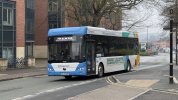
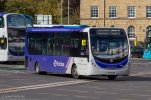
Moving photos work too, that's how I got most of mine. See the attached Yutong photo. I found when switching to a DSLR that colour depth is so much better than a phone, even a high end one (I used an iPhone 14 Pro).

With moving photos on a proper camera, you're still limited with moving photos and destination screens. If you slow the shutter speed, you get motion blur; so slowing it to get destinations only works if the bus is still and you have steady hands (which I do not!). See attached Streetlite photo

To add more complexity, different blind types have different LED refresh rates. Newer Hanover blinds tend to be really difficult to photograph; whereas the older Hanover and other ones like Aesys show up really well at faster shutter speeds.

Another thing you'll notice when switching from a phone to a proper camera is that phones do so much processing automatically and cameras make you do it yourself. Experimentation is all I can recommend; try things out and find out what works for you

 

Attachments

  • 54407171780_260477e95e_o.jpg
    54407171780_260477e95e_o.jpg
    1.9 MB · Views: 50
  • 54787298415_8998b8426d_k.jpg
    54787298415_8998b8426d_k.jpg
    825.4 KB · Views: 50

Class139 fan

New Member
Joined
3 Oct 2025
Messages
2
Location
Oxfordshire
Something I found during my time photographing buses with my phone is that the telephoto camera tends to use a slower shutter speed. What iPhone model do you have? The magnification of which the telephoto camera activates varies between models. The obvious change here is you need to stand further back!
Thanks for the tips, I have an iPhone 7
 

mattb7tl

Member
Joined
1 Jan 2022
Messages
255
Location
Huddersfield
A third party camera app allow you to have more control over other camera settings including shutter speeds (like Halide)
 

joieman

Member
Joined
18 Feb 2024
Messages
965
Location
Loughborough
...your best chance would be to slow the shutter speed down, however that can come with the drawback of drawing in more light and making the photo lighter.
And increases the chance of undesirable motion blurring.
The other option would be a standard camera rather than a phone camera or cheaper "bridge" camera. That does come with a cost implication, but I find you get better control of anything illuminated using LEDs.
I have a relatively high-end compact camera and blinds still often don't come out properly. It even affects film cameras (example below), so I don't think any camera is altogether immune to this issue.
roll_3_img_035b~2.jpg
(Arriva Midlands 8032 on the service 127 in Loughborough. Photo taken with an SLR camera on 35mm film.)
 
Status
Not open for further replies.

Top