heart-of-wessex
Established Member
Hello all,
Anyone know a lot about OpenOffice Calc (basically a spreadsheet application)?
Basically I'm compiling one of my bus fleetbooks into an Excel sheet, because there are so many changes it's easier to edit it in the OpenOffice Calc program by adding a new line. This works fine as it moves the other rows down one cell. However I have another column next to the bus number that has a highlighted cell, which means I've sighted that particular bus.
This seems to be OK until I insert a new row between bus numbers, which as I say shifts the cells down however the highlighted cell stay's where it is, therefore it's all out of sync and has to be re-done.
I've attached 2 pictures.
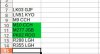
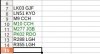
DEMO1.jpg shows that I've seen M10 CCH, M277 JGB and PK02 RDO.
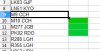
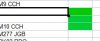
Now let's say they got two new buses M10 CCA and M10 CCB (I do the list in alphabetical order of registration) so as you can see in DEMO2.jpg I've inserted two new rows, BUT the highlighted green cells are still in place.
I then have to shift them down manually provided I remember!!
Is there a way of shifting the highlighted cells down everytime I insert a new row?
Any help appreciated!!
Anyone know a lot about OpenOffice Calc (basically a spreadsheet application)?
Basically I'm compiling one of my bus fleetbooks into an Excel sheet, because there are so many changes it's easier to edit it in the OpenOffice Calc program by adding a new line. This works fine as it moves the other rows down one cell. However I have another column next to the bus number that has a highlighted cell, which means I've sighted that particular bus.
This seems to be OK until I insert a new row between bus numbers, which as I say shifts the cells down however the highlighted cell stay's where it is, therefore it's all out of sync and has to be re-done.
I've attached 2 pictures.
DEMO1.jpg shows that I've seen M10 CCH, M277 JGB and PK02 RDO.
Now let's say they got two new buses M10 CCA and M10 CCB (I do the list in alphabetical order of registration) so as you can see in DEMO2.jpg I've inserted two new rows, BUT the highlighted green cells are still in place.
I then have to shift them down manually provided I remember!!
Is there a way of shifting the highlighted cells down everytime I insert a new row?
Any help appreciated!!