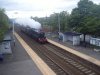
thanks for all the advice, i'll try that computer program. i'll also read the manual - i have a samsung S1030. here's a picture, taken at about 8:00 in the morning two months ago (the loco doing a fairly high speed):
Your camera does have a few setting that will help. You should have a look through the manual and find the sections on changing the ISO setting and on setting manual exposure.
As others have said, selecting a higher shutter speed will help to stop motion but you may not be comfortable with setting the exposure manually the so the simplest solution may be to change the ISO setting. If you think you are in a situation that requires a high shutter speed then change the ISO setting (works just like film speed when we had film in our cameras) to a high setting and the automatic exposure on your camera should give you a higher shutter speed. You'll see that displayed on the screen towards the top left. Aim for 1/500th or better.
Be warned that increasing the ISO setting can result in lower quality pictures.
The picture you posted was taken at 1/60th second and ISO 80. Digital photos have this information embedded in the file so you can always check later. Look up EXIF with Google.
Another thing you may try is panning the camera to follow the movement. You'll get a blurred background but the subject will be sharp.
The wonderful thing about digital cameras is that it costs nothing to experiment and while you may not want to do that with the trains you are out to photograph, there are plenty of other subjects that move at similar speeds. You can't beat trial end error to help you improve your photographs.
Good luck!


 , I'm pretty much a novice to the subject, but is there any way to get rid of motion blur from photos I've taken? (I'm assuming probably not). Also, how can I stop it in the first place? I have taken various photos of trains going at high speed from close by, and some have been blurred and some not - I don't know why? I'm using a Samsung S1030...