
• Our new ticketing site is now live! Using either this or the original site (both powered by TrainSplit) helps support the running of the forum with every ticket purchase! Find out more and ask any questions/give us feedback in this thread!

Microsoft Train Simulator

Status
Not open for further replies.

RoadCar

Member
Joined
11 Jul 2025
Messages
12
Location
Lincolnshire
Hi,

I’ve a Windows XP laptop. Recently bought to play old games.

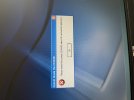
I’ve installed Microsoft Train Simulator. The 2001 one. But when I come to play it all I get is Please insert disc into CD drive.

There are two disc but neither seem to work.

I’ve bought Trainz 2006 simulator that works fine. But it is MSTS I’d like to play.

Any ideas?

Thanks
 

Attachments

  • IMG_0485.jpeg
    IMG_0485.jpeg
    3.9 MB · Views: 34
Sponsor Post - registered members do not see these adverts; click here to register, or click here to log in
R

RailUK Forums

fb2126

Member
Joined
3 Mar 2024
Messages
44
Location
London
Does the laptop have a DVD drive or did you install with the .iso file?
 

Trackman

Established Member
Joined
28 Feb 2013
Messages
4,245
Location
Lewisham
The prompt to insert disc should be on the MSTS install screen, not a
windows alert.
You should be OK on an XP laptop according to google.
 

nlogax

Established Member
Joined
29 May 2011
Messages
6,007
Location
Mostly Glasgow-ish. Mostly.
I may still have my original discs from 2001, if they're around here I'd be happy to send them on to you. Will have a dig through ye olde case of software on physical media.
 

Trackman

Established Member
Joined
28 Feb 2013
Messages
4,245
Location
Lewisham
I may still have my original discs from 2001, if they're around here I'd be happy to send them on to you. Will have a dig through ye olde case of software on physical media.
Was just going to say, I'd gladly send you mine, but they are in deep storage.
Must go for ten a penny on eBay
 
Status
Not open for further replies.

Top