
-
Our new ticketing site is now live! Using either this or the original site (both powered by TrainSplit) helps support the running of the forum with every ticket purchase! Find out more and ask any questions/give us feedback in this thread!
You are using an out of date browser. It may not display this or other websites correctly.
You should upgrade or use an alternative browser.
You should upgrade or use an alternative browser.
Connectivity Challenges with Digital Railcard
- Thread starter Enjoy12481632
- Start date
- Status
- Not open for further replies.
Sponsor Post - registered members do not see these adverts; click here to register, or click here to log in
R
RailUK Forums
martin_coxy
Member
I was told by trip.com that offline use was only available in their Trainpal app. However, I was given lots of misinformation..
== Doublepost prevention - post automatically merged: ==
I just tested the 3 day theory but not opening the Trip.com app for 72 hours and then opening it offline.. Result - no railcard.
However, I opened it online, viewed my railcard and then closed it went offline and opened it again. Railcard still working.
So no cache error and it seems to exhibit the same functionality as I've heard the Railcard app does. It clears the cache after 72 hours and repopulates it on next online use.
I might try a few less hours to see if it is actually 72..
Probably too much time on my hands but this weird functionality really bugged me, hence chasing trip.com for two weeks and probably 20 interactions and then the RDG for another couple of weeks.
If this functionality is consistent and I know how to check it before a journey and fix it if/when broken then I'll be relatively happy
== Doublepost prevention - post automatically merged: ==
== Doublepost prevention - post automatically merged: ==
I just tested the 3 day theory but not opening the Trip.com app for 72 hours and then opening it offline.. Result - no railcard.
However, I opened it online, viewed my railcard and then closed it went offline and opened it again. Railcard still working.
So no cache error and it seems to exhibit the same functionality as I've heard the Railcard app does. It clears the cache after 72 hours and repopulates it on next online use.
I might try a few less hours to see if it is actually 72..
Probably too much time on my hands but this weird functionality really bugged me, hence chasing trip.com for two weeks and probably 20 interactions and then the RDG for another couple of weeks.
If this functionality is consistent and I know how to check it before a journey and fix it if/when broken then I'll be relatively happy
== Doublepost prevention - post automatically merged: ==
What happens in the Trainpal app? Do you also have two ways to access the railcard?That fix may work for Trip.com but not for Trainpal. Any thoughts on how to get Trainpal working given they are basically the same company?
Last edited:
No just the one through account and that never works unless wifi is good and so I try to leave it on the screen when I leave as the 5 minute walk to the station is not usually enough time for external phone data (ID Mobile) to pick it up again. You'd think I was out in the sticks but this happens all the time.
martin_coxy
Member
So if you go through the start of a process to buy a rail ticket (in Trip.com this means click on the train icon) you don't then see a button to view your railcard? The method you mention is also in the Trip.com app but never works offline. The second method (in the ticket buying screen) is the one that I've found to work..No just the one through account and that never works unless wifi is good and so I try to leave it on the screen when I leave as the 5 minute walk to the station is not usually enough time for external phone data (ID Mobile) to pick it up again. You'd think I was out in the sticks but this happens all the time.
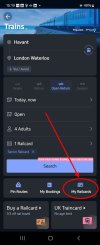
I installed the TrainPal app to see how similar it is to Trip.com. The layout is different but I'd expect it to have the same underlying framework. When I wrote to Trip.com customer services I was regularly given info on how to do things in Trainpal because they didn't seem to be able to apply their services appropriately to customers of each brand.
I didn't see an option to view a railcard in either 'account' or the buy tickets > trains screen but that's not a surprise because I didn't buy a railcard from them. I'd chase them for info on how to view the railcard offline and if you're not satisfied, go to the RDG with a complaint. The latter was quite responsive and eventually said that Trip.com was accredited and offline use was tested and approved. I'd assume they'd claim the same for Trainpal and would then need to define how..
Maybe I've just got too much time on my hands

The trip.com app now allows me to see my railcard when offline.
I viewed the railcard in the app yesterday; went into airplane mode and the railcard was still visible. Phone reboot and back into airplane mode today and the railcard is still visible. Maybe trip.com have got their act together!
Could other trip.com users please check.
I viewed the railcard in the app yesterday; went into airplane mode and the railcard was still visible. Phone reboot and back into airplane mode today and the railcard is still visible. Maybe trip.com have got their act together!
Could other trip.com users please check.
- Status
- Not open for further replies.