I have added Tap2Go on my existing SWR Touch card and received the email confirming that. I nominated Basingstoke as the station to activate it. I have a Senior Railcard which I want to add to the account. It's not offering me this option at present. Can I do this activation at a TVM at the station or do I have to tap the Smartcard Reader? If I do the latter is it expecting me to immediately embark on a journey (without the Railcard discount)? I would like to use it for a journey tomorrow, but I want to be sure to get the Railcard discount.

-
Our new ticketing site is now live! Using either this or the original site (both powered by TrainSplit) helps support the running of the forum with every ticket purchase! Find out more and ask any questions/give us feedback in this thread!
You are using an out of date browser. It may not display this or other websites correctly.
You should upgrade or use an alternative browser.
You should upgrade or use an alternative browser.
Activating SWR Tap2Go and loading a Railcard
- Thread starter fandroid
- Start date
- Status
- Not open for further replies.
Sponsor Post - registered members do not see these adverts; click here to register, or click here to log in
R
RailUK Forums
As far as I understand, it will be wanting you to begin a journey immediately.I have added Tap2Go on my existing SWR Touch card and received the email confirming that. I nominated Basingstoke as the station to activate it. I have a Senior Railcard which I want to add to the account. It's not offering me this option at present. Can I do this activation at a TVM at the station or do I have to tap the Smartcard Reader? If I do the latter is it expecting me to immediately embark on a journey (without the Railcard discount)? I would like to use it for a journey tomorrow, but I want to be sure to get the Railcard discount.
You may be able to use the National Rail Smartcard app to load the Tap2Go "travel authority" onto the smartcard from your phone, provided you have one that supports NFC though. Alternatively, the SWR app might have a ticket loading feature. I know this is what I have done in the past for activating keyGo on my smartcard precisely for the same reason as you.
Joe Paxton
Established Member
- Joined
- 12 Jan 2017
- Messages
- 2,958
I have added Tap2Go on my existing SWR Touch card and received the email confirming that. I nominated Basingstoke as the station to activate it. I have a Senior Railcard which I want to add to the account. It's not offering me this option at present. Can I do this activation at a TVM at the station or do I have to tap the Smartcard Reader? If I do the latter is it expecting me to immediately embark on a journey (without the Railcard discount)? I would like to use it for a journey tomorrow, but I want to be sure to get the Railcard discount.
I think the only way to add a Railcard to your Tap2Go account is via your SWR online ticketing account.
As per the screenshot below (borrowed with gratitude from this March '23 post by @Couru), there is a Manage Your Railcard option down the left-hand side which I believe appears once Tap2Go has been enabled...
Couru
Member
For what its worth, I never got this to work. The automated system always declined my railcard, regardless of what info I gave it. I ended up just biting the bullet and only using my tap2go card for small journeys the Railcard wouldn't be valid for anyway, then buying tickets manually for longer journeys.(borrowed with gratitude from this March '23 post by @Couru)
I have to assume that this function will turn up when I tap on with the card for the first time. It's not showing on a normal account login. I'm due to arrive back in Basingstoke in 25 mins, so I'll try it on a TVM reader. I don't want to risk getting an Uncompleted Journey penalty by tapping on a gate reader.I think the only way to add a Railcard to your Tap2Go account is via your SWR online ticketing account.
As per the screenshot below (borrowed with gratitude from this March '23 post by @Couru), there is a Manage Your Railcard option down the left-hand side which I believe appears once Tap2Go has been enabled...

I've been happy with the Touch card for normal ticket purchase, but frustrated at it not being usable for Evening/Sunday Out tickets. That was my only motivation for giving Tap2Go a try as they claim to charge all applicable walk-up ticket prices. We'll see!
SWR TVMs, as far as I'm aware, are not set up to load Smartcard tickets bought anywhere except for the TVM itself, including Tap2Go.I have to assume that this function will turn up when I tap on with the card for the first time. It's not showing on a normal account login. I'm due to arrive back in Basingstoke in 25 mins, so I'll try it on a TVM reader. I don't want to risk getting an Uncompleted Journey penalty by tapping on a gate reader.

Haywain
Veteran Member
- Joined
- 3 Feb 2013
- Messages
- 24,592
From reading the relevant pages on the SWR website, it appears that Tap2Go is loaded when you touch in at the specified station to start a journey (this means at a barrier or standalone validator, not a TVM). If it works in the same way as GTR's KeyGo you could then touch out immediately and will not be charged.SWR TVMs, as far as I'm aware, are not set up to load Smartcard tickets bought anywhere except for the TVM itself, including Tap2Go.
SWT_USER
Member
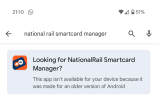
Is this app still current? For me the Google play store says 'not available for your device because it was made for an older version of Android.' if people are still expected to use it but they don't bother keeping it updated that's pretty poor...As far as I understand, it will be wanting you to begin a journey immediately.
You may be able to use the National Rail Smartcard app to load the Tap2Go "travel authority" onto the smartcard from your phone, provided you have one that supports NFC though. Alternatively, the SWR app might have a ticket loading feature. I know this is what I have done in the past for activating keyGo on my smartcard precisely for the same reason as you.
How odd... Shows on my Pixel 9 Pro fine!Is this app still current? For me the Google play store says 'not available for your device because it was made for an older version of Android.' if people are still expected to use it but they don't bother keeping it updated that's pretty poor...

SWT_USER
Member
How strange... I'm using the pixel 9 pro XL and this is what I get:How odd... Shows on my Pixel 9 Pro fine!
Image shows text advising national rail smartcard manager app not available for my phone.
Attachments
I had the same issue. It took 5(!) emails back and forth with SWR but eventually they said that there was a technical issue that had now been resolved.For what its worth, I never got this to work. The automated system always declined my railcard, regardless of what info I gave it.
If anyone else is having this issue you can reach the Smartcard team directly by emailing smartcards@swrailway.com - they were very helpful!
- Status
- Not open for further replies.