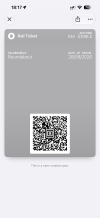
The newly released iOS 27 includes the function to scan a barcode to create an Apple Wallet pass.
https://www.tapsmart.com/tips-and-tricks/create-a-pass-wallet/
Anyone tried this with e-tickets from retailers that don't support automatic Apple Wallet pass creation? And what about PlusBus?
Any pitfalls?
Will guards and RPIs quibble if shown something not in the official format, even if the barcode is fine? Place your bets for the first case in disputes & prosecutions.
https://www.tapsmart.com/tips-and-tricks/create-a-pass-wallet/
Point your camera at the card’s barcode or QR code and Wallet copies it directly onto a new digital pass – no typing required for that part. Note that it also works from an image or screenshot – hit the Photos button in the corner to grab something from your camera roll. This is handy if you already have the code digitized in an email or another app and just want to move it to Wallet.
On an iPhone 17 Pro, 17 Pro Max, or Air, Wallet goes a step further: Visual Intelligence tries to read the printed text on the card too, pre-filling the name, location, and other details for you to check over before saving. On other Apple Intelligence-capable iPhones (15 Pro and later), you get the barcode scan but not the automatic text fill-in – you’ll fill in the rest of the fields yourself.
Anyone tried this with e-tickets from retailers that don't support automatic Apple Wallet pass creation? And what about PlusBus?
Any pitfalls?
Will guards and RPIs quibble if shown something not in the official format, even if the barcode is fine? Place your bets for the first case in disputes & prosecutions.