• Our new ticketing site is now live! Using either this or the original site (both powered by TrainSplit) helps support the running of the forum with every ticket purchase! Find out more and ask any questions/give us feedback in this thread!

Is it possible to select specific trains and book as one through-journey ?

Willie Bee

Member
Joined
26 Aug 2018
Messages
952
Location
Whitley Bay
Is it possible to book tickets based on my own requirements (train times) and combine these into a single through ticket ?

My wife and I like to relax in the LNER lounge before we leave , hence the request

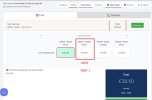
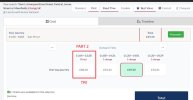
Example ( see images)

NCL to YRK 09:27 - 10:28

YRK to LIV 11:04 - 13:28
 

Attachments

  • j1.jpg
    j1.jpg
    71.7 KB · Views: 36
  • j2.jpg
    j2.jpg
    66.8 KB · Views: 36
Sponsor Post - registered members do not see these adverts; click here to register, or click here to log in
R

RailUK Forums

signed

Established Member
Joined
13 May 2024
Messages
2,367
Location
ROI
Add York as a via point, select change at, and add whatever extra change time at York. Couldn't walk you through it as I am a new site user.
 

yorkie

Forum Staff
Staff Member
Administrator
Joined
6 Jun 2005
Messages
78,169
Location
Yorkshire
Yes, exactly that.


1778343194554.png

You can also select your desired seats on both trains.
 

Haywain

Veteran Member
Joined
3 Feb 2013
Messages
24,477
Is it possible to book tickets based on my own requirements (train times) and combine these into a single through ticket ?

My wife and I like to relax in the LNER lounge before we leave , hence the request

Example ( see images)

NCL to YRK 09:27 - 10:28

YRK to LIV 11:04 - 13:28
You could but you might find a through ticket is more expensive than split tickets.
 

Willie Bee

Member
Joined
26 Aug 2018
Messages
952
Location
Whitley Bay
Yes, exactly that.


View attachment 203868

You can also select your desired seats on both trains.
Thanks .. I tried and tried that without luck .. but I use the 'old layout' which might have been the problem.

I do know how add changes etc or longer wait times, but still it wouldn't work for me
 

yorkie

Forum Staff
Staff Member
Administrator
Joined
6 Jun 2005
Messages
78,169
Location
Yorkshire
Thanks .. I tried and tried that without luck .. but I use the 'old layout' which might have been the problem.
The link should work; it works for me if I open in a completely different browsing session.

Try loading it in a different web browser (e.g. FireFox etc), and/or try loading it in private/incognito mode.
I do know how add changes etc or longer wait times, but still it wouldn't work for me
What advanced options did you specify, exactly?
 

Willie Bee

Member
Joined
26 Aug 2018
Messages
952
Location
Whitley Bay
The link should work; it works for me if I open in a completely different browsing session.

Try loading it in a different web browser (e.g. FireFox etc), and/or try loading it in private/incognito mode.

What advanced options did you specify, exactly?
Thanks again . yes the link works well

I actually managed to get the result I wanted now, after a few more attempts.

When I tweaked 'waiting time' even by a small amount, it affected the result. (is there a default waiting time already built in ?)

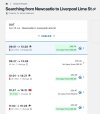
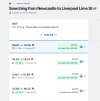
I eventually got the first (LNER) train and then the 2nd (TPE) but it was adding another change at Manchester.

I added maximum changes = 1 ... "Hey Presto" .. the exact result it worked.

I am not actually travelling until early August (2nd), so I'll try again soon .. even using the link and changing dates isn't bringing up the LNER train. It is 12 weeks from today, so maybe it will show up soon. I For one week earlier, it is there.

Maybe I just have to be patient:smile:
 

Attachments

  • NL26j.jpg
    NL26j.jpg
    96.2 KB · Views: 12
  • NL2A.jpg
    NL2A.jpg
    88.5 KB · Views: 12

OscarH

Established Member
Joined
15 Sep 2020
Messages
1,258
Location
Crawley
When I tweaked 'waiting time' even by a small amount, it affected the result. (is there a default waiting time already built in ?)
The waiting time you add is on top of the industry set minimum connection time at the station in question
 

yorkie

Forum Staff
Staff Member
Administrator
Joined
6 Jun 2005
Messages
78,169
Location
Yorkshire
Thanks again . yes the link works well

I actually managed to get the result I wanted now, after a few more attempts.

When I tweaked 'waiting time' even by a small amount, it affected the result. (is there a default waiting time already built in ?)
The minimum interchange time at York is 8 mins, this is added to any additional time you specify.
I eventually got the first (LNER) train and then the 2nd (TPE) but it was adding another change at Manchester.

I added maximum changes = 1 ... "Hey Presto" .. the exact result it worked.

I am not actually travelling until early August (2nd), so I'll try again soon .. even using the link and changing dates isn't bringing up the LNER train. It is 12 weeks from today, so maybe it will show up soon. I For one week earlier, it is there.
It's too early to book. See:
TransPennine Express
  • Saturday service: 18 July
  • Sunday service: 19 July
I recommend waiting until the tickets are released before searching, and also mentioning the date of travel in any post when seeking advice.
 

Willie Bee

Member
Joined
26 Aug 2018
Messages
952
Location
Whitley Bay
OP here

All sorted now .. was able to book my tickets this morning on the Forum's site .. used the link above, provided by "Yorkie"

thanks again ! :smile:
 

Top