
• Our new ticketing site is now live! Using either this or the original site (both powered by TrainSplit) helps support the running of the forum with every ticket purchase! Find out more and ask any questions/give us feedback in this thread!

Rail maps, pdf printing advice needed.

Status
Not open for further replies.

negone

Member
Joined
4 Jul 2022
Messages
65
Location
Liverpool
I am trying to print out the pdf northern rail map and parts of the Aldestrop atlas,

Using pdf-x and it just defaults the whole map to A4.

How do I print it in sections. Has someone already done this, so I can download the different sections.
 
Sponsor Post - registered members do not see these adverts; click here to register, or click here to log in
R

RailUK Forums

blackfive460

Member
Joined
23 Jun 2010
Messages
869
I am trying to print out the pdf northern rail map and parts of the Aldestrop atlas,

Using pdf-x and it just defaults the whole map to A4.

How do I print it in sections. Has someone already done this, so I can download the different sections.

With Adobe Acrobat Reader (or whatever it's called these days) there's an option to print the current view. That should achieve what you want.
 

etr221

Established Member
Joined
10 Mar 2018
Messages
1,605
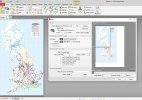
On the software I use for viewing PDFs, on printing there is a 'scaling' parameter including an option to 'Tile Pages' (All or Large), which will do what you want - see image. Don't know to what extent other software has this.Note (i) size of original file(!) and (ii) it can take a bit of time to do its stuff, arranging date onto sheets...

PDFprintsm.jpg

My software: PDF-XChange Editor (free) from Tracker Software (https://www.tracker-software.com/products). Their plain Viewer is 'Discontinued' but still available for download (and has feature)

Edited to add:
1) Some printers have similar functionality - tiling or 'poster printing' to print on multiple sheeets.
2) A most useful piece of software to have is a a 'PDF printer', that system sees as a printer, but creates PDFs. Many available...
 
Last edited:
Status
Not open for further replies.

Top