
-
Our new ticketing site is now live! Using either this or the original site (both powered by TrainSplit) helps support the running of the forum with every ticket purchase! Find out more and ask any questions/give us feedback in this thread!
You are using an out of date browser. It may not display this or other websites correctly.
You should upgrade or use an alternative browser.
You should upgrade or use an alternative browser.
Formatting in Word 2010, where is the tab?
- Thread starter amateur
- Start date
- Status
- Not open for further replies.
Sponsor Post - registered members do not see these adverts; click here to register, or click here to log in
R
RailUK Forums
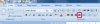
See attached. But basically on the home tab look along around the middle of that tab's options there's a set of button in the 'paragraph' section and it should be in there. Highlight which bits of text you want justified and then hit the button indicated.
In Word 2010 (and 2007) everything is basically right in front of you under the various tabs along the top rather than being in drop down menus or in separate pop up windows.
In Word 2010 (and 2007) everything is basically right in front of you under the various tabs along the top rather than being in drop down menus or in separate pop up windows.
Attachments

I tend to use the keyboard shortcuts.
Select the text, then hold down the CTRL key and tap a letter
L - left
R - right
E - centre
J - justified
other useful CTRL + shortcuts in Word
A - select all
B - bold
C - copy
I - italic
V - paste
X - cut
Y - redo
Z - undo
F3 - change case (This one is shift rather than CTRL)
Select the text, then hold down the CTRL key and tap a letter
L - left
R - right
E - centre
J - justified
other useful CTRL + shortcuts in Word
A - select all
B - bold
C - copy
I - italic
V - paste
X - cut
Y - redo
Z - undo
F3 - change case (This one is shift rather than CTRL)
Last edited:
other useful CTRL + shortcuts in Word
A - select all
B - bold
C - copy
V - paste
The number of people who don't know those ones especially copy/paste is staggering!

table38
Established Member
But don't get me started on Ctrl/F which does "find" in 99.9% of all Microsoft products with one significant and irritating exception 
table38
Established Member
You could always do it once and save it as a style, then apply that style...
Or sometimes I find "Format Painter" easier, and I think since 2010, if you double-click on the Format Painter button, it "latches" and you can just apply the new format to multiple paragraphs.
Or just right-click on the paragraph and then click on Paragraph
Or sometimes I find "Format Painter" easier, and I think since 2010, if you double-click on the Format Painter button, it "latches" and you can just apply the new format to multiple paragraphs.
Or just right-click on the paragraph and then click on Paragraph
Basically, I have the same problem as this thread
http://www.wordbanter.com/showthread.php?t=90710
Any ideas? I tried format painter still no good!
Or do I do right indent?
http://www.wordbanter.com/showthread.php?t=90710
Any ideas? I tried format painter still no good!
Or do I do right indent?
Last edited:
Just highlight all the text in the document then press the justify button that I highlighted in my first reply.
table38
Established Member
Works for me, but I've got 2013 here 
It might be worth doing View -> Ruler to see if there is anything screwy going on with the margins?
It might be worth doing View -> Ruler to see if there is anything screwy going on with the margins?
This works fine using 2010 at least on my 2010.
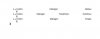
This is our document, five paragraphs three in bullet points:

We then highlight all the text of the document like so:

Then we press the 'Justify' button which I've highlighted in a red box:

This has the following effect on our document:

Job done. If that doesn't solve either something is up with your document or you're after something else that I've not understood!
This is our document, five paragraphs three in bullet points:
We then highlight all the text of the document like so:
Then we press the 'Justify' button which I've highlighted in a red box:
This has the following effect on our document:
Job done. If that doesn't solve either something is up with your document or you're after something else that I've not understood!
Just highlight all the text in the document then press the justify button that I highlighted in my first reply.
Plain Text is fine - it's the lines with bullet points which don't justify (by simply doing cntrl j as per thread above
iM sure its to do with the margins?
table38
Established Member
Rather than send the whole document, can you replicate it on just one page and attach it to the thread and I'm sure ainsworth74 or I will be able to fix it!
If the text is sensitive or confidential, just replicate it with something copy-n-pasted off t'internet.
-- edit --
Oh something else that sometimes works, try copying the text into Notepad, then close Word and re-open it and create a brand new empty document; then copy the text back in from Notepad, and re-apply the formatting.
If the text is sensitive or confidential, just replicate it with something copy-n-pasted off t'internet.
-- edit --
Oh something else that sometimes works, try copying the text into Notepad, then close Word and re-open it and create a brand new empty document; then copy the text back in from Notepad, and re-apply the formatting.
Last edited:
I rather think that Amateur has bulleted text that is only 3 or 4 words long per para and is expecting those few words to spread across the screen.
This is a fundamental misunderstanding of what justification is.
Justify doesn't mean 'spread the text across the page'
What it does mean is 'In paragraphs of text, stretch lines in that paragraph as necessary so that all lines end at the right hand margin/indent (except the last line) Ainsworth's example demonstrates this.
You can force text to spread across the page by justifying and inserting soft line breaks where you want each new line to start.
This however doesn't force new paragraphs, so you can't put a bullet on each line unless you have a hard line break after each soft line break. (I've been teaching MS Office to advanced level for far too long)
You can close the text up if you want by reducing the font size on the blank lines.
A soft line break is shift + enter for those who don't know what one is. It shows as the little bent arrow when you have the show/hide on.
This is a fundamental misunderstanding of what justification is.
Justify doesn't mean 'spread the text across the page'
What it does mean is 'In paragraphs of text, stretch lines in that paragraph as necessary so that all lines end at the right hand margin/indent (except the last line) Ainsworth's example demonstrates this.
You can force text to spread across the page by justifying and inserting soft line breaks where you want each new line to start.
This however doesn't force new paragraphs, so you can't put a bullet on each line unless you have a hard line break after each soft line break. (I've been teaching MS Office to advanced level for far too long)
You can close the text up if you want by reducing the font size on the blank lines.
A soft line break is shift + enter for those who don't know what one is. It shows as the little bent arrow when you have the show/hide on.
Attachments
Last edited:
- Status
- Not open for further replies.